Audit the page you're on, in one click.
Click the icon and PageChecks runs all 10 checks against the page you're already on — meta tags, canonical, robots, headings, images, Open Graph, schema, performance, links, and accessibility — then explains every finding in plain English with a fix you can copy straight out.
Add to Chrome
v1.1.0 Free forever No account 100% client-side
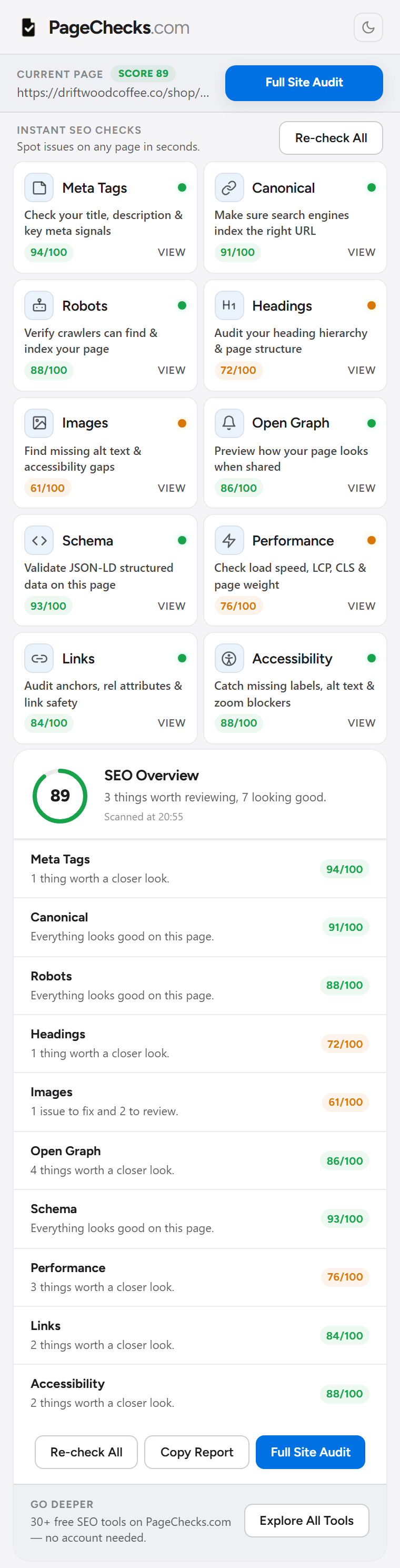
Ten checks. One popup.
Every check runs against the page you're already looking at — the live, rendered DOM, not a cached copy. Click through to a check for the plain-English fix.
- Meta Tags
- Title and description length, missing tags, and a live Google search preview.
- Canonical
- Self-referencing, cross-domain, or missing canonical tags that split your rankings.
- Robots
- Meta robots directives that quietly deindex a page nobody meant to hide.
- Headings
- Missing H1s, skipped levels, and heading order that confuses readers and crawlers alike.
- Images
- Missing alt text, undeclared dimensions, and images that slow the page down.
- Open Graph
- og:title, og:description, and og:image presence, plus image size and ratio checks.
- Schema
- JSON-LD syntax errors and incomplete required fields — the kind that silently break rich results.
- Performance
- Core Web Vitals: LCP, CLS, and total page weight.
- Links
- Broken anchors, risky rel attributes, and links that leak SEO value off the page.
- Accessibility
- Missing form labels, unlabeled buttons, blocked pinch-zoom, and other WCAG gaps.
Built for the finding, not just the flag.
A colored dot tells you something's wrong. These four checks show exactly what, why, and how to fix it.
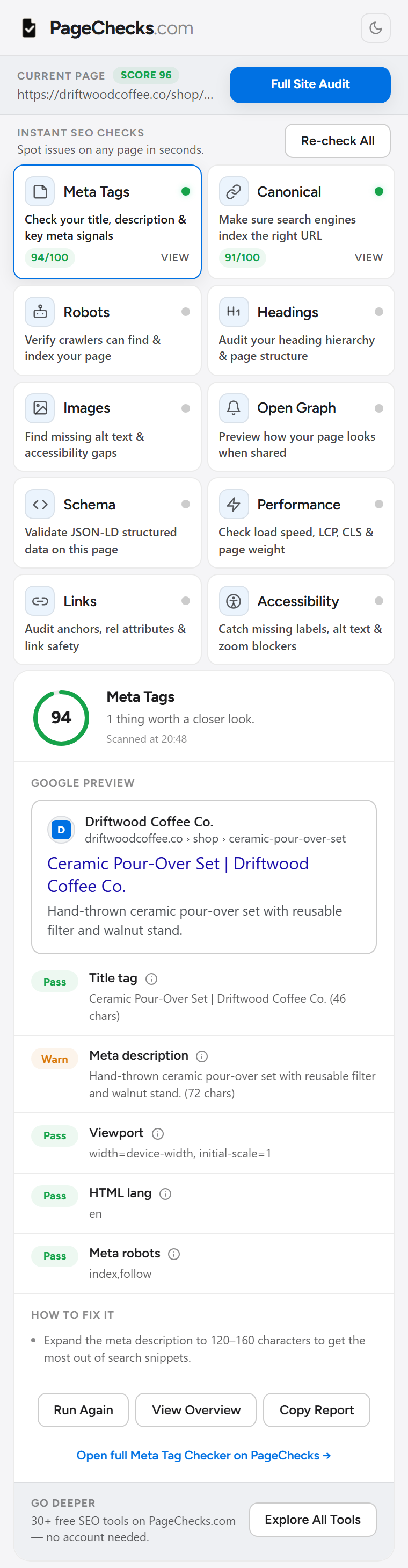
See it the way Google sees it.
The Meta Tags check renders a live Google search preview next to your title and description, so a truncated title or a description ten characters short of useful gets caught before indexing — not after. Every result carries an exact character count and a fix underneath it.
Open the Meta Tag Checker
Preview the share card before anyone else does.
Open Graph checks render your actual og:image — not a placeholder — inside a Facebook/LinkedIn card and a separate X preview, and flag it when the declared size doesn't match the real file or the ratio is wrong.
Open the Open Graph Checker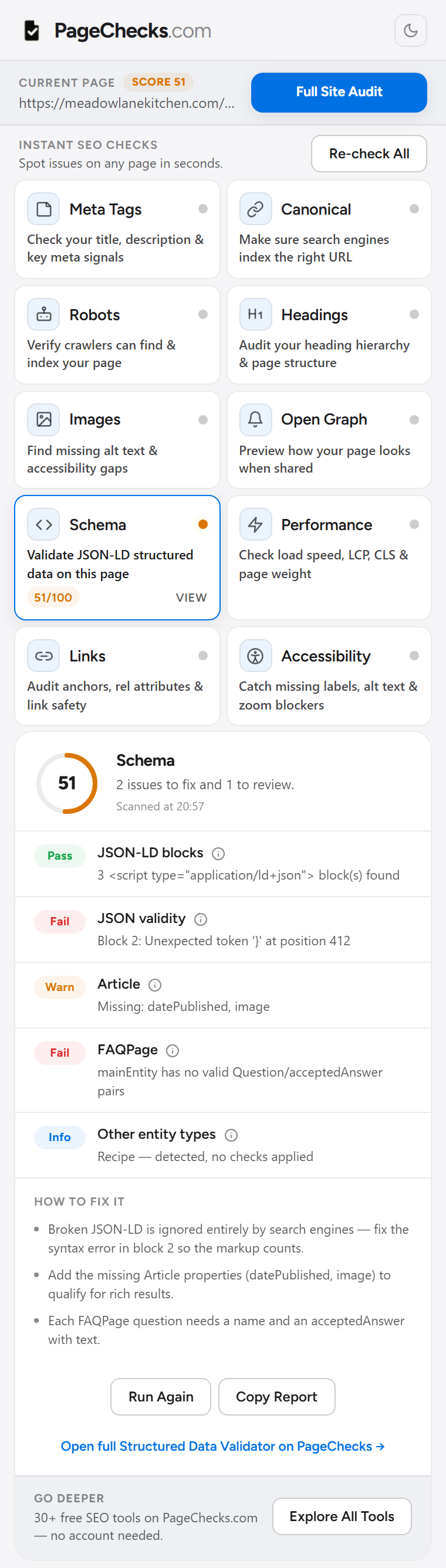
Broken JSON-LD doesn't fail quietly.
The Schema check parses every JSON-LD block on the page, points at the exact syntax error and character position when one breaks, and checks required fields for Article, FAQPage, Recipe, and the other types Google renders as rich results.
Open the Structured Data Validator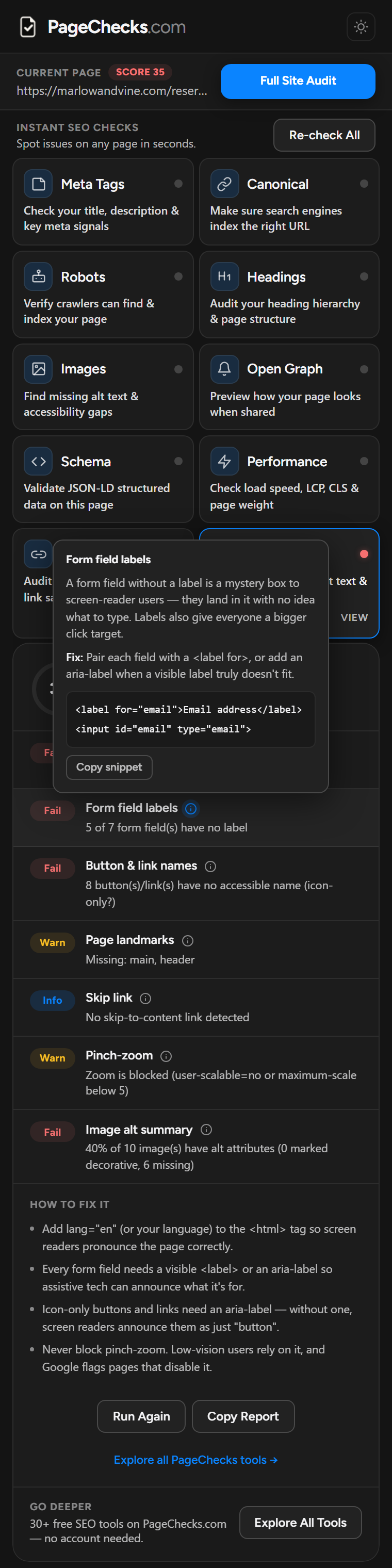
Every finding explains itself.
Click the ⓘ next to any result, from Meta Tags to Accessibility, and get what it means, why it matters, and how to fix it — in plain English, with a code snippet you can copy straight into your editor. No SEO glossary required.
One score. One click to report it.
Run a check and the toolbar badge turns green, amber, or red with the score already on it — 0 to 100, the same scale on every page. Open the popup and Copy Report turns the full breakdown into markdown, ready to paste into a ticket, a PR, or a Slack thread.
Nothing leaves your browser.
Every check runs in the page you're already looking at. PageChecks doesn't call home, doesn't log the URLs you check, and doesn't ask you to sign in — there's no server in the loop, so there's nothing to send.
How it works
Three steps, no setup.
-
Click the icon
No URL to paste and no tab to switch — PageChecks reads the page you're already on.
-
Scan all 10 checks
Meta tags, canonical, robots, headings, images, Open Graph, schema, performance, links, and accessibility run in under a second.
-
Fix it and move on
Open the ⓘ on any finding for the plain-English fix, then hit Copy Report to take the whole thing with you.
Add it once. Use it on everything.
Free. No account. v1.1.0.