Common Technical SEO Issues That Kill Rankings
Most ranking losses caused by technical SEO are not mysterious. They come from a small set of recurring failures: broken crawl paths, weak canonical signals, redirect mistakes, slow templates, and site-maintenance drift that nobody catches early enough.
- Technical SEO
- Rankings
- Indexing
- Site Health
When rankings fall, most teams blame content first. They are usually looking in the wrong place. The damage often lives in plumbing that nobody touched on purpose. A redirect rule from two migrations ago. A template that emits the wrong canonical. A robots.txt that started returning a 404 after a deploy. None of it looks broken to a human clicking through the site, which is exactly why it survives. This post is a field guide to the specific failures that suppress rankings, what each one looks like on a real site, and the fastest way to catch it before it spreads across a directory.
Key Takeaways
- Most ranking-killing technical issues scale across templates or site rules, so one bad pattern hits hundreds of pages at once.
- Since 2013, 66.5% of sampled links have rotted (Ahrefs Link Rot Study, 2024), proof that crawl paths decay silently over time.
- Conflicting and render-changed canonicals are now more common than missing ones, per the HTTP Archive Web Almanac (2024).
- The fastest way to catch these is a small sample audit, then a specialist tool for the exact failure mode.
The same few technical issues keep killing rankings
The same failures recur because they sit in shared infrastructure, not on individual pages. A single bad redirect rule, template directive, or crawl-control file affects every page it touches. Google’s own crawl-budget guidance warns that long redirect chains and soft 404s waste crawl resources (Google Search Central, 2025), and that cost scales with the site.
That is the core idea behind this whole post. When you fix one page, you fix one page. When you fix a template or a rule, you fix everything downstream of it. The reverse is also true: when something breaks at the infrastructure level, the bleeding is wide, not deep.
In our experience, the most expensive technical problems we have seen never tripped an alarm. The site loaded. Pages resolved. Search Console looked busy. The traffic just got quieter, one template at a time, until a quarter-over-quarter chart finally made someone ask why.
So the right mindset is pattern hunting. You are not looking for a dramatic outage. You are looking for a small flaw that repeats. A quick Technical SEO Audit on one URL plus a small internal sample is usually enough to tell you whether a problem is isolated or systemic.
What do broken crawl paths actually look like?
Broken crawl paths are dead or blocked routes between the pages that matter and the rest of the site. They show up as orphaned pages, links to removed URLs, or hubs that quietly stopped linking down. Since January 2013, 66.5% of links across more than two million sampled sites have rotted (Ahrefs Link Rot Study, 2024). That decay is constant, and it lands on every site eventually.
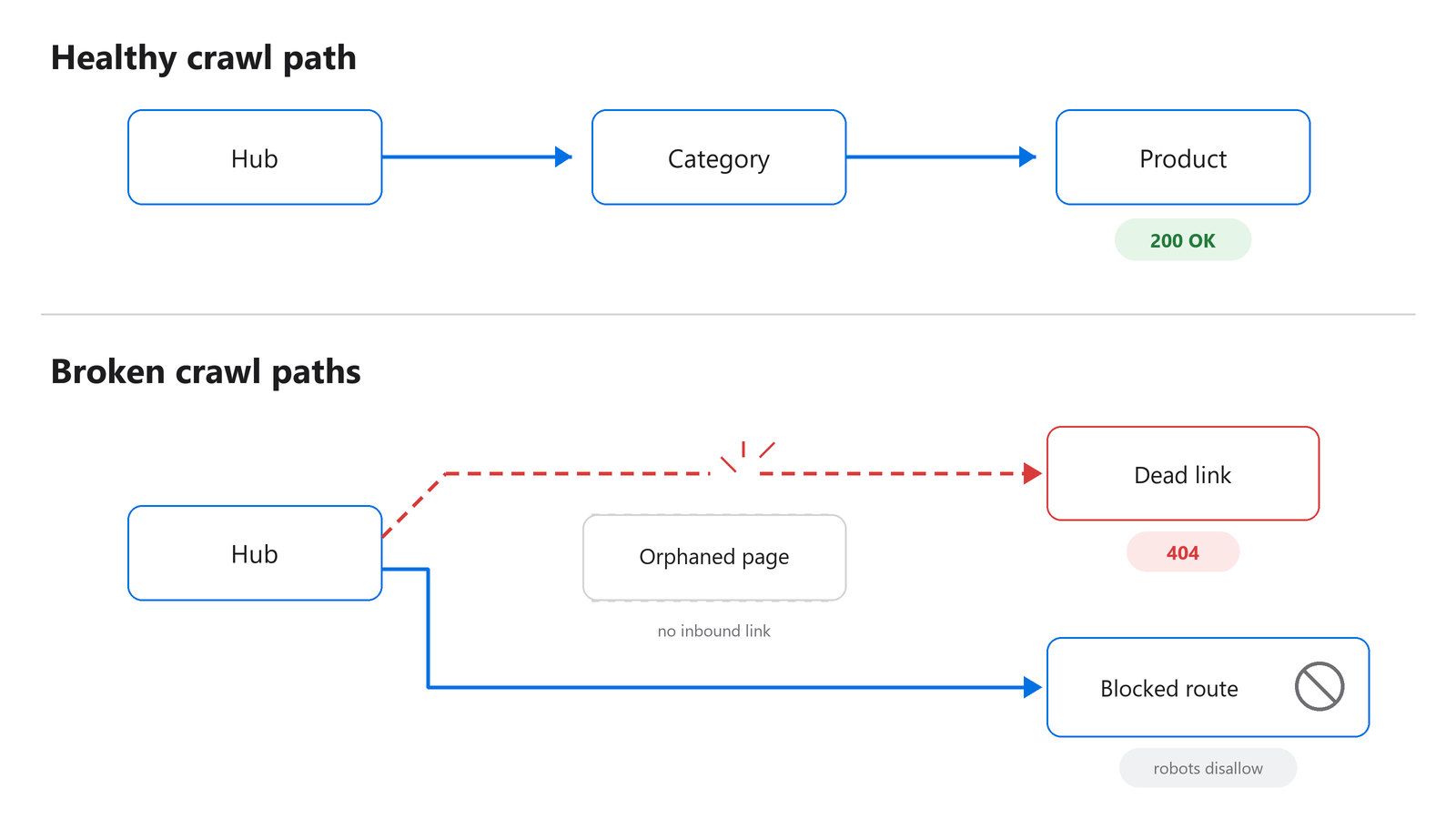
Figure 1: A healthy crawl path keeps key pages one or two clicks from a hub; broken paths strand them.
The signs on a real site
You will see a category page that used to link to fifty products now linking to thirty, because the other twenty were deleted and the links 404 instead of redirecting. You will see a blog hub that got redesigned and dropped its pagination, so older posts lost their only inbound link. You will see a faceted-navigation rule that started returning blocked pages where crawlable ones used to be.
The fastest way to spot it
Run the page that should be a hub and check whether its internal links still resolve. If the audit shows broken or redirected internal links on a sample, assume the pattern repeats elsewhere. The fix is not heroic. It is reconnecting the routes and redirecting the dead ones to live equivalents.
Most teams treat broken links as a UX nuisance. The bigger cost is discovery. A removed link does not just annoy a user, it removes the only crawl path a deep page had.
How do redirect chains and loops suppress rankings?
Redirect chains string several hops between the requested URL and the final page; loops never resolve at all. Both waste crawl budget and dilute signals. Google explicitly warns to avoid long redirect chains because they have a negative effect on crawling (Google Search Central, 2025). Each hop looks harmless in isolation, which is why these accumulate unnoticed.
The classic version stacks up over years. A migration sends /old to /new. A protocol upgrade sends http to https. A trailing-slash fix sends /new to /new/. Now a single old URL takes three hops, and every internal link still pointing at the original URL pays that tax on every crawl.
Where they hide
Redirect debt hides in old internal links, in hardcoded navigation, and in sitemaps that still list the pre-redirect URLs. Loops usually come from two competing rules: one forces a trailing slash, another strips it, and the server bounces between them forever. Browsers eventually show a “too many redirects” error, but crawlers just give up first.
If a Technical SEO Audit flags redirect instability, move straight into the Redirect Checker and trace the full hop sequence for the worst offenders. The goal is one hop, maximum. Point internal links and sitemap entries at the final destination so the redirect only ever fires for external traffic.
Why do canonical signals so often conflict?
Canonical tags tell search engines which URL is the master copy. They fail when the page, the redirect path, and the canonical target disagree. The HTTP Archive Web Almanac (2024) found 0.8% of pages send conflicting canonical values across methods, and 2.1% of mobile canonicals change during rendering. The failure mode is now “wrong signal” more than “missing signal.”
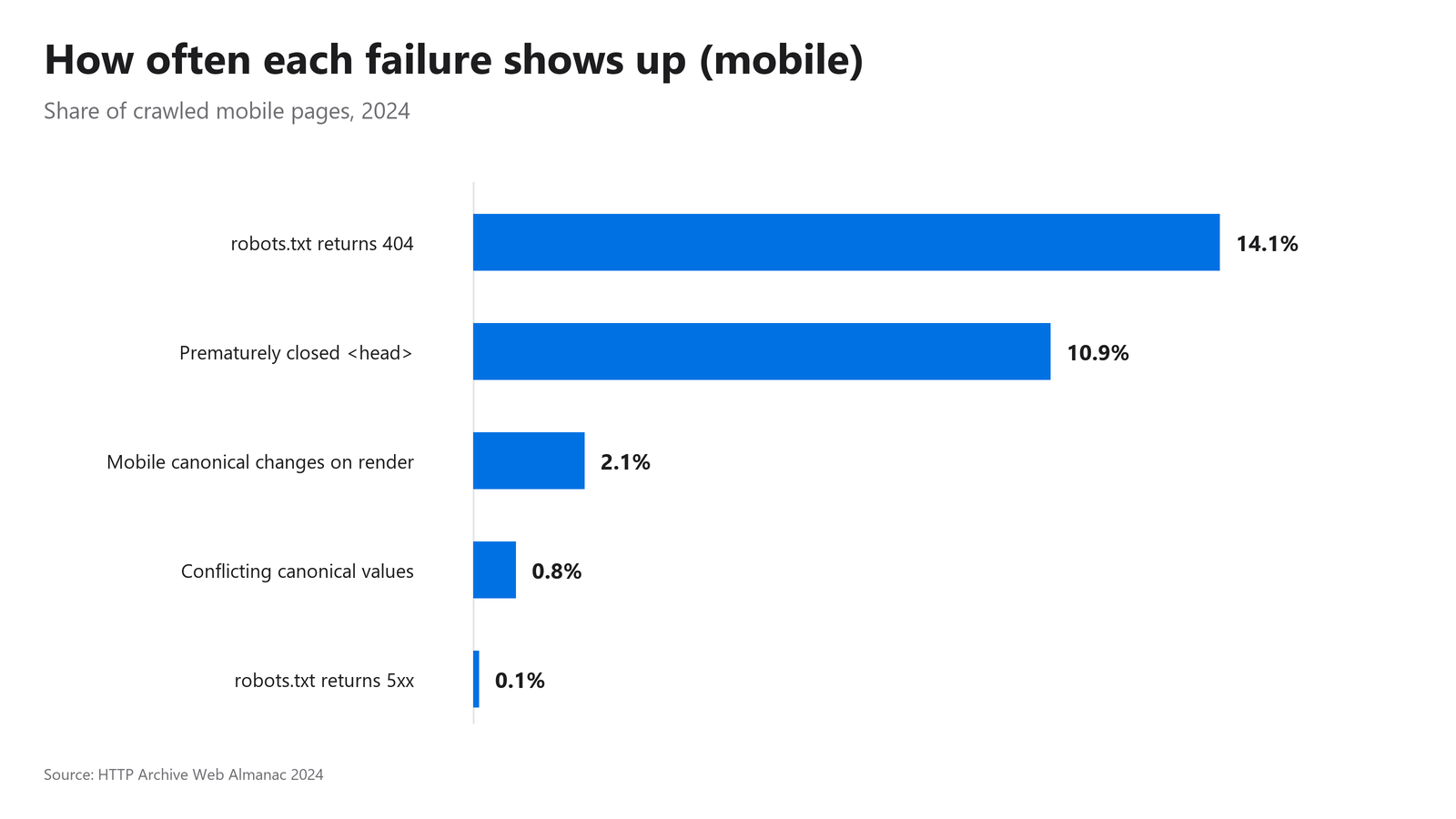
Figure 2: How often each failure type shows up across crawled sites, drawn from the 2024 Web Almanac.
How weak canonicals creep in
A template hardcodes a self-referencing canonical, then a parameter-heavy URL inherits it and points a hundred filtered pages at the same target. Or a CMS injects a canonical via JavaScript that overrides the clean one in the raw HTML, which is how the render-changed cases happen. The page says one thing to a quick view and another after rendering.
There is also a quieter killer. The HTTP Archive Web Almanac (2024) reports that 10.9% of mobile pages prematurely close the <head>, and any canonical or robots directive placed after that point can be ignored entirely. Your signal is technically present and completely invisible.
Catching it fast
Strong pages that stop behaving like primary URLs are the tell. They drop from the index, or a parameter version starts ranking instead. Pull the raw HTML and the rendered HTML for a sample, then confirm the canonical matches in both and points at a 200-status URL, not a redirect.
What does maintenance drift do to crawl-control files?
Maintenance drift is the slow rot of files like robots.txt and sitemaps as deploys, refactors, and CMS changes pile up. A robots.txt that starts returning the wrong status can block a whole site. The HTTP Archive Web Almanac (2024) found 14.1% of mobile sites returned a 404 for robots.txt and 0.1% returned a 5xx, which Google may treat as a full-site block for around 30 days.
The drift you should watch for
Sitemaps are the usual canary. They fill with stale URLs, lose whole sections after a relaunch, or keep listing pages that now 301 or 404. The sitemap is not causing the ranking loss, but a neglected sitemap almost always signals neglected crawl maintenance underneath it. Validate it with the XML Sitemap Validator and treat mismatches as a symptom, not the disease.
Across the audits we have reviewed at PageChecks, the single most common “surprise” finding is a crawl-control file that changed behavior during an unrelated deploy. Nobody edited robots.txt on purpose. A framework upgrade changed how it was served, and the status code flipped.
How to catch it before Google does
Check the actual status code of robots.txt and a few key URLs directly, not in a browser tab. A page can render fine for you while returning a header that confuses a crawler. The HTTP Header Checker shows the raw response, including status, content-type, and caching directives, so you can confirm the response layer is stable across templates.
Slow templates hurt more than slow pages
Slow performance kills rankings when it comes from the template, because the cost repeats on every page built from that template. Only 43% of mobile origins and 54% of desktop origins pass all three Core Web Vitals (HTTP Archive Web Almanac, 2024). That pass rate dropped partly because Interaction to Next Paint replaced First Input Delay in March 2024 as a stricter measure.
A single heavy hero image is a page problem. A render-blocking script in the global header is a template problem, and it slows every page on the site at once. That is the distinction that matters when you triage. If many pages regress together after a release, suspect the shared layer, not the content.
The practitioner read
When you see a cluster of URLs slow down on the same date, do not start optimizing individual pages. Look at what shipped. A new analytics tag, a font swap, a third-party widget added to the global footer, any of these can push interactivity past the threshold sitewide. The Technical SEO Audit includes PageSpeed context, which helps you decide whether a regression is a template issue worth real engineering time or a one-off page you can ignore.
FAQ
Which technical SEO issue usually does the most damage?
Crawl and access problems do the most damage because they decide whether a page is seen at all. A blocked robots.txt or a broken crawl path can suppress entire sections. Google’s crawl-budget guidance treats redirect chains and soft 404s as real waste (Google Search Central, 2025), so access issues sit at the top of the list.
How can I tell if a problem is isolated or sitewide?
Run one target URL plus a small internal sample. If the same failure appears on the main page and across the sample, it is almost certainly a template or rule problem, not a one-off. Patterns that repeat across a sample of pages are the signal that you are looking at infrastructure, which scales the damage fast.
Are redirect chains really worth fixing if they still resolve?
Yes. A chain that resolves still wastes crawl budget on every hop and dilutes the signals passed through it. Google states long chains have a negative effect on crawling (Google Search Central, 2025). Point internal links and sitemap entries at the final URL so the redirect fires only for external traffic, not your own crawl paths.
Why would a canonical tag get ignored?
A canonical is ignored when it conflicts with other signals or sits in invalid markup. The HTTP Archive Web Almanac (2024) found 10.9% of mobile pages close the <head> early, which can drop any directive placed after that point. Always confirm your canonical appears in both raw and rendered HTML and targets a 200-status URL.
How often should I check for these failures?
Check after every meaningful release and on a steady monthly rhythm. Most of these issues arrive through deploys, migrations, and CMS changes, not gradual decay alone. A quick audit after each launch catches drift while it is still one template wide, before it spreads across a directory and starts pulling a whole section out of the index.
What To Do Next
Start with the Technical SEO Audit on one important URL plus a small internal sample. If the findings point at redirects, trace them in the Redirect Checker. If discovery looks stale, validate it with the XML Sitemap Validator, and confirm the response layer with the HTTP Header Checker when status codes look suspect. If you are working through a relaunch, read the Technical SEO Checklist for Site Migrations, and for help sequencing the fixes, see how to prioritize technical SEO issues after an audit.