Site Migration SEO Checklist: A Technical SEO Checklist for Launch
Most migration-related SEO losses come from a handful of technical failures that were predictable before launch. This checklist gives you a practical way to check redirects, page health, canonical signals, internal links, and sitemap behavior without turning the release into chaos.
- Technical SEO
- Site Migration
- SEO Checklist
- Redirects
A migration changes URLs, templates, redirects, canonicals, internal links, and the sitemap at the same time. That is a lot of surface area to break in one release. In a 2022 Twitter poll of more than 1,300 SEO practitioners, 78.3% said they expect a traffic drop when handling a site migration (YouGov, 2022). Treat that as sentiment, not a measured outcome. But it tells you something real: even experienced teams brace for damage. This checklist is built around a release timeline. You verify parity before launch, test redirects on launch day, and confirm signals are transferring after launch. Nothing here is about redesign opinions. It is about not losing rankings during the move.
Key Takeaways
- Verify redirect, canonical, internal-link, and sitemap parity between staging and production before DNS cutover, not after.
- Use server-side 301 or 308 permanent redirects mapped 1:1, and keep them in place at least one year (Google Search Central, 2026).
- On launch day, test redirects in bulk with a crawler plus spot checks in the URL Inspection Tool.
- For cross-domain moves, the Change of Address signal window is 180 days (Google Search Console Help, 2026).
- Decide your rollback trigger before launch so you are not improvising under pressure.
Why a Site Migration SEO Checklist Matters
Migrations lose rankings because they sever continuity between the old site and the new one. Google needs to transfer ranking signals across URLs, and that only works when redirects, canonicals, and links agree. Google recommends keeping redirects in place for at least a year so its systems can move signals to the new URLs (Google Search Central, 2026).
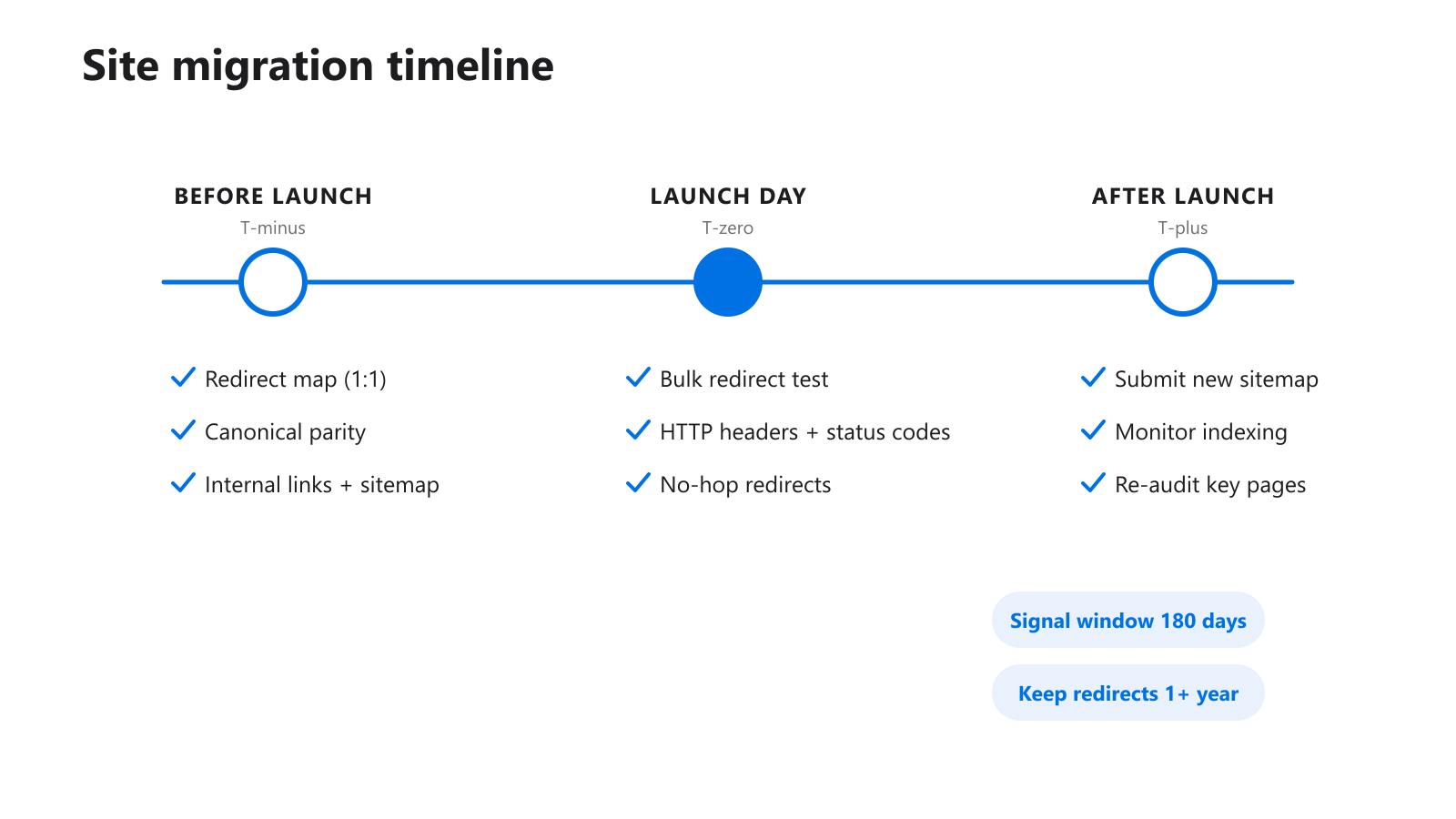
Figure 1: A migration is a timeline of checkpoints, not a single launch event.
The failure pattern is consistent. Old URLs point nowhere useful, or they redirect through three hops, or the new template drops a canonical tag that used to anchor a page. None of these are exotic. They are predictable, and they are catchable before users ever see the new site.
One change at a time
The riskiest migrations bundle a redesign, a protocol switch, and a URL change into one release. When something breaks, you cannot tell which change caused it. Where you can, separate the moves. A protocol change one week, a URL structure change later. Diagnosis gets far easier, and so does rollback.
Signals do not transfer instantly
Recovery takes patience. Google has to see your redirects repeatedly before it records the change as permanent. Rushing a rollback two weeks in often destroys the very signal transfer that was about to work.
Technical SEO Checklist: What Should You Verify Before Launch?
Before launch, you verify parity: the new site should match the old site’s intent for every signal that affects indexing. That means redirect mapping, canonical assignment, internal links, and sitemap output all agree with the plan. Google advises testing redirects before or at launch, using the URL Inspection Tool for individual URLs and a crawler for bulk checks (Google Search Central, 2026).
Build a real redirect map
Export every indexed and traffic-earning old URL. Map each one to a single destination on the new site. Page-level, not section-level. A blanket rule that sends every old URL to the homepage is one of the most common migration mistakes I see, and it tells Google those pages are gone.
On one ecommerce move, the team had a clean mapping sheet and still lost a third of category traffic. The reason: the sheet was never wired into the server config. The plan was perfect and the live behavior was wrong. Always test the live site, never trust the document alone.
Confirm canonical parity
Pull the canonical tag for a representative sample of old pages, then check what the matching new template outputs. Template rewrites silently drop or self-reference canonicals all the time. Catch that on staging.
Check internal links and sitemap output
Internal links should point at new URLs, not at old ones that now redirect. Stale internal links create needless redirect hops and waste crawl budget. Confirm the sitemap generator reflects the new route logic too. If routing changed and the sitemap did not, you ship a broken map on day one. Run a staging crawl, then run the Technical SEO Audit against a few key staging URLs to confirm the templates are coherent before cutover.
What Do You Test on Launch Day?
On launch day you test behavior, not plans. The moment DNS resolves to the new site, crawl your full old-URL list and confirm every redirect resolves correctly in one hop. Googlebot will follow up to 10 hops in a chain, but Google advises redirecting straight to the final destination to avoid latency and compatibility problems (Google Search Central, 2026).
Redirect testing comes first
Use server-side permanent redirects (301 or 308) wherever you technically can (Google Search Central, 2026). Then validate them. Run your old URLs through the Redirect Checker and watch for four things:
- old URLs that do not land where the map says they should
- multi-hop chains where one hop would do
- redirect loops that never resolve
- page classes that behave inconsistently with each other
Verify the live HTTP layer
Status codes and headers are easy to get wrong when infrastructure changes. Run a sample of live URLs through the HTTP Header Checker to confirm pages return 200, redirects return 301 or 308, and there is no surprise noindex or HSTS misconfiguration. A migration that changes hosting often changes caching and header behavior with it.
Most launch-day panic comes from browsing the new site randomly and reacting to whatever you happen to notice. That is the slowest possible method. A fixed order, audit, then redirects, then headers, then sitemap, finds systemic problems faster because it tells you whether a fault is template-wide or page-specific within minutes.
How Do You Confirm Recovery After Launch?
After launch you confirm that signals are transferring and discovery is working. Submit a new XML sitemap, keep the old one live temporarily so Google sees both URL sets, and monitor the Search Console indexing reports. For cross-domain moves, the Change of Address tool holds the redirect relationship for 180 days before treating the old site as unrelated (Google Search Console Help, 2026).
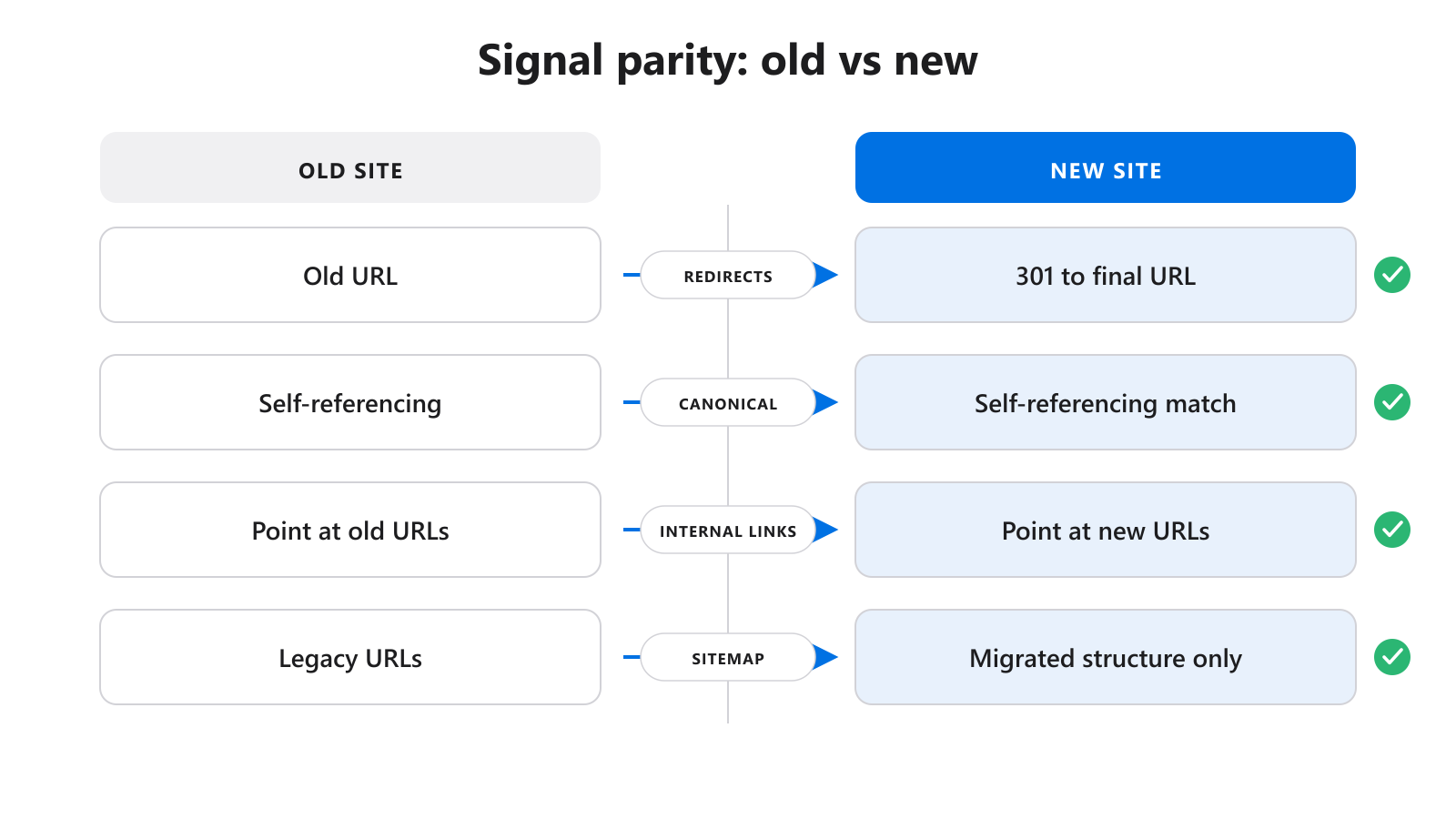
Figure 2: Parity means the new site matches the old site’s signals one for one.
Validate the live sitemap
Once production is stable, run the live file through the XML Sitemap Validator. You want every important new URL present, no stale legacy URLs lingering, and a file that mirrors the migrated structure. A sitemap that still lists old paths slows discovery instead of helping it.
Re-audit your priority pages
Re-run the Technical SEO Audit across commercial pages, major resource pages, and category hubs in the first week. You are looking for whether the migration is stabilizing or whether new issues keep surfacing after each fix pass. Patience matters here. Signal transfer is gradual, so judge recovery over weeks, not days.
Keep a migration log
Track tested URLs, redirect outcomes, sitemap checks, header anomalies, and every fix you applied and rechecked. When routing, content, and infrastructure are handled by different people, that log is the difference between coordinated cleanup and three people debugging the same bug separately.
How Do You Plan for Rollback?
Plan for rollback before launch by defining a clear trigger and a clear deadline. Decide in advance what level of traffic or indexing loss justifies reverting, and who makes that call. Because Google needs to see redirects repeatedly to record them as permanent, John Mueller recommended keeping a 301 in place for at least a year (Search Engine Journal, 2021).
Do not panic-revert
A two-week dip is not a failed migration. It is often signal transfer in progress. Reverting too early throws away the consolidation Google was about to complete and forces you to start the clock over. Set a realistic observation window, four to eight weeks, before you treat a drop as structural.
Keep the old environment recoverable
Rollback readiness means the old templates, redirects, and config are restorable quickly. If you bundled three changes into one release, you cannot revert one cleanly. That is the strongest argument for shipping migration changes separately. When something does go wrong, you can undo a single layer instead of the whole project.
Tie monitoring to the 180-day window
For cross-domain moves, keep redirects and active monitoring running well past 180 days, longer if old URLs still earn Google traffic. After that window, Google stops associating the two sites, so any gap in redirect discipline becomes permanent.
The Most Common Migration Mistakes
The most common migration mistakes are blanket homepage redirects, redirect chains, broken canonical parity, stale internal links, and bundling too many changes at once. Each one breaks the continuity Google relies on to move ranking signals. Google’s guidance is consistent: map redirects 1:1, redirect to the final destination, and keep links and signals coherent (Google Search Central, 2026).
Trusting the mapping sheet over the live site
The plan is not the behavior. Test what actually happens when a request hits the server, then compare it to the map.
Treating one clean homepage check as proof
A working homepage tells you almost nothing about deep pages. Test a representative sample across page types, including templates that earn the most organic traffic.
Fixing pages one at a time
If the same fault shows up across several URLs, it is a system problem. Fix the template or the rule, then recheck the sample, rather than patching pages individually.
FAQ
How long should I keep redirects after a migration?
Keep permanent redirects in place at least one year so Google can transfer signals to the new URLs (Google Search Central, 2026). For cross-domain moves, extend monitoring past the 180-day Change of Address window, and keep redirects longer if old URLs still receive traffic.
Should I use 301 or 302 redirects for a site move?
Use 301 or 308 permanent redirects for site moves whenever technically possible (Google Search Central, 2026). A 302 signals a temporary move and can delay signal transfer. Reserve temporary redirects for genuinely temporary situations, not permanent URL changes.
How fast will traffic recover after a migration?
Recovery is gradual because Google must see redirects repeatedly before recording them as permanent. Expect weeks, not days, and avoid reverting on an early dip. Set a four to eight week observation window, then assess whether the trend is structural before deciding on any rollback.
Can I redirect every old URL to the homepage?
No. Blanket homepage redirects tell Google the old pages are gone and discard their accumulated signals. Map each important old URL to its closest matching new page, one to one. Page-level mapping is the single highest-leverage step in migration redirect work.
Do internal links really matter during a migration?
Yes. Internal links that still point at old URLs create extra redirect hops and waste crawl budget on a freshly changed site. Update navigation, hubs, and contextual links to point directly at new URLs so crawlers reach the right pages without bouncing through redirects.
What To Do Next
Run the Technical SEO Audit as your first health check before cutover and again right after launch, then move into the Redirect Checker, XML Sitemap Validator, and HTTP Header Checker as your findings narrow. If you already have a report and need to decide what gets fixed first, read How to Prioritize Technical SEO Issues After an Audit. To sharpen the audit itself, see What a Technical SEO Audit Should Actually Check.