What Is ClaudeBot? GPTBot vs ChatGPT-User vs ClaudeBot Explained
Most teams still treat AI crawlers as one bucket. That is the mistake. Different bots do different jobs, and one robots.txt change can affect training, live retrieval, and citations in completely different ways.
- AI SEO
- GPTBot
- ClaudeBot
- Robots.txt
You see a string in your logs called GPTBot. You block it, close the ticket, and tell the team the site is private from AI. That single move covers far less than people think. OpenAI runs three separate bots with three separate jobs, and Anthropic does the same. GPTBot originated roughly 7.5% of all verified bot traffic in 2025, second only to Googlebot (Cloudflare Radar, 2025). But that one crawler is only a third of OpenAI’s footprint. This post compares the bots side by side so you can decide what each one should reach.
Key Takeaways
- GPTBot and ClaudeBot are training crawlers. ChatGPT-User and Claude-User are live agents that fetch a page only when someone asks a question.
- OAI-SearchBot and Claude-SearchBot are search indexers. Blocking them removes you from AI search answers, not from training.
- Blocking one bot is not blocking all AI visibility. Training crawling ran roughly 32 times the volume of live user-action crawling at peak (Cloudflare Radar, 2025).
- Decide per purpose: training, live retrieval, search indexing. Then test the real paths with a tool.
What Is ClaudeBot?
ClaudeBot is Anthropic’s training crawler, used to collect public web content for model development. It is separate from Claude-User, which fetches pages for live user requests, and Claude-SearchBot, which supports search inside Claude. Blocking ClaudeBot opts out of that training crawl without automatically blocking Anthropic’s live-retrieval or search agents.
The three jobs an AI bot can do
Every AI bot you meet is doing one of three things: training a model, fetching a page live for a user, or indexing your site for AI search. These are separate pipelines with separate consequences. Training crawling dominated total AI crawl volume in 2025, running about 7 to 8 times search crawling and 32 times user-action crawling at peak (Cloudflare Radar, 2025).
Once you sort bots by job instead of by vendor, the policy gets simpler. A training crawler reads your pages to improve a future model. It sends almost no traffic back. A live agent visits because a person typed a question right now and the assistant wants a current answer. A search indexer builds the catalog that powers AI search results.
These jobs do not move together. You can welcome live retrieval and still refuse training. You can stay in AI search while opting out of the training set. The names look interchangeable. The outcomes are not.
Why “block AI” is the wrong instruction
When a stakeholder says “block AI,” they almost always mean one job, not all three. Usually they want to stop their content feeding a training set for legal or licensing reasons. They rarely mean “remove us from ChatGPT answers when a customer asks about us.” Yet a blanket Disallow for every AI user-agent does exactly that second thing too.
GPTBot vs ChatGPT-User vs OAI-SearchBot: how do OpenAI’s bots differ?
OpenAI runs three distinct user agents, each with its own robots.txt control and its own published IP ranges. GPTBot collects content to train foundation models. ChatGPT-User fetches a page live, only when a user or a Custom GPT asks something. OAI-SearchBot indexes sites for ChatGPT search results (OpenAI Developer Docs, 2025). Three names, three jobs, three separate decisions.
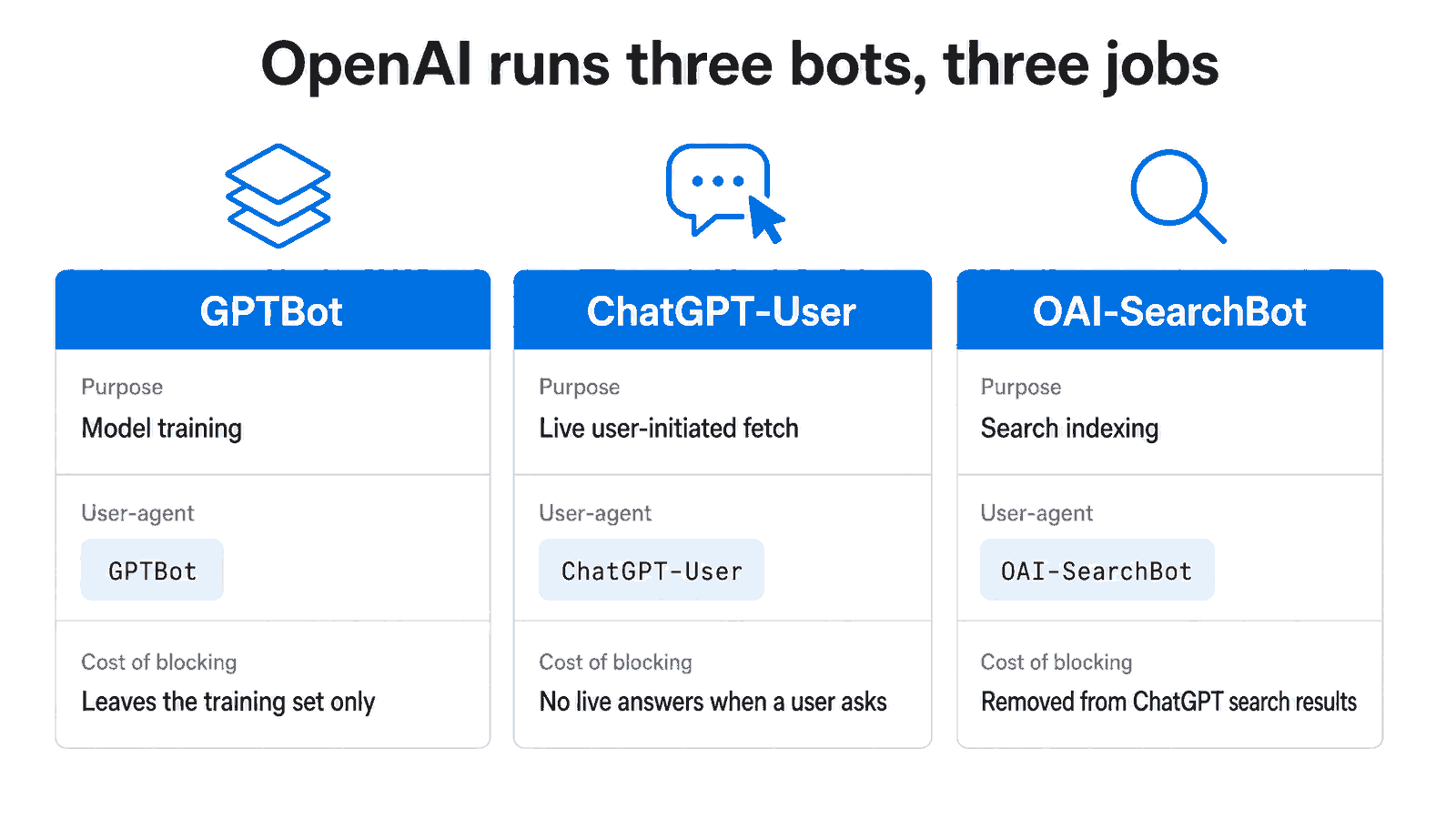
Figure 1: The same vendor runs a training crawler, a live agent, and a search indexer, and blocking each one costs you something different.
The practical mistake is treating GPTBot as a synonym for ChatGPT. It is not. GPTBot never shows up when a person asks a live question. That is ChatGPT-User’s job. Simon Willison documented in August 2025 that OpenAI’s ChatGPT agent uses the ChatGPT-User user-agent for its browsing actions, which confirms ChatGPT-User as the live, agentic identity distinct from the training crawler.
So if you block GPTBot, you have stopped contributing to training. ChatGPT can still fetch your page live through ChatGPT-User, and you can still appear in ChatGPT search through OAI-SearchBot, as long as you have not also blocked those two. That separation is the whole point.
The user-agent strings to watch
You will see these in your logs and your robots.txt rules:
GPTBot: training crawlerChatGPT-User: live, user-initiated fetchOAI-SearchBot: search indexing for ChatGPT
Each one reads its own directive. A rule aimed at GPTBot does nothing to the other two.
ClaudeBot vs Claude-User vs Claude-SearchBot: does Anthropic work the same way?
Yes, Anthropic mirrors the same three-job structure. ClaudeBot collects web content for model training. Claude-User accesses pages in real time when someone asks Claude a question. Claude-SearchBot crawls to improve search result quality. Anthropic’s documentation warns that blocking Claude-User or Claude-SearchBot reduces your visibility in user-directed and AI-powered search (Search Engine Roundtable, 2026).
That documentation update, reported in late February 2026, matters because it puts the consequence in writing. Block ClaudeBot and you only leave the training set. Block Claude-User or Claude-SearchBot and you start vanishing from live answers and AI search inside Claude.
In audits, the most common Anthropic mistake we see is a copied snippet that disallows ClaudeBot only, written years ago when ClaudeBot was the only Anthropic agent anyone knew about. The team thinks they made a clean training choice. They never touched Claude-User, so live retrieval still works, which is often what they actually wanted by accident.
Mapping OpenAI bots to Anthropic bots
The two vendors line up cleanly by job:
- Training:
GPTBotandClaudeBot - Live retrieval:
ChatGPT-UserandClaude-User - Search indexing:
OAI-SearchBotandClaude-SearchBot
If you write policy by job rather than by brand, you cover both vendors with the same three decisions instead of six scattered rules.
Blocking one bot is not the same as blocking all AI visibility
Because the bots split by purpose, and publishers treat those purposes differently. In a study of 100 top US and UK news sites, ClaudeBot was blocked by 69% and GPTBot by 62%, while the user-initiated Perplexity-User was blocked by only 17% (BuzzStream, 2026). Those sites are blocking training hard and keeping live retrieval open.
That gap is the entire strategy in one number. News publishers are not anti-AI. They are anti-free-training. They block the crawlers that take content for a model and send nothing back, while they keep the live agents that arrive with a reader attached. The split is deliberate, and you can copy the logic even if your blocking rates differ from a news site’s.
A quick reality check on volume helps here. When you do not filter by purpose, ClaudeBot and GPTBot together accounted for nearly half of observed AI crawling activity in Cloudflare’s August 2025 sample (Cloudflare, 2025). Those are the training bots. They are loud in your logs and they are the easiest to refuse without losing any live visibility.
Live retrieval is the fast-growing job
The category to watch is live retrieval. User-action AI crawling grew more than 15-fold across 2025, the fastest-growing crawl category, and within it ChatGPT-User drove the large majority of requests (Cloudflare, 2025). If you block that traffic with a careless blanket rule, you are cutting off the segment that is growing fastest and that actually delivers a user to your page.
How do you decide what to allow per page type?
Decide by content type, not by fear. Public educational content, documentation, and editorial pages usually benefit from live retrieval and search indexing, so allow those agents there. Private app areas, account pages, and internal workflows do not need any AI access, so block all three jobs on those paths. Write the policy around what each page is for.
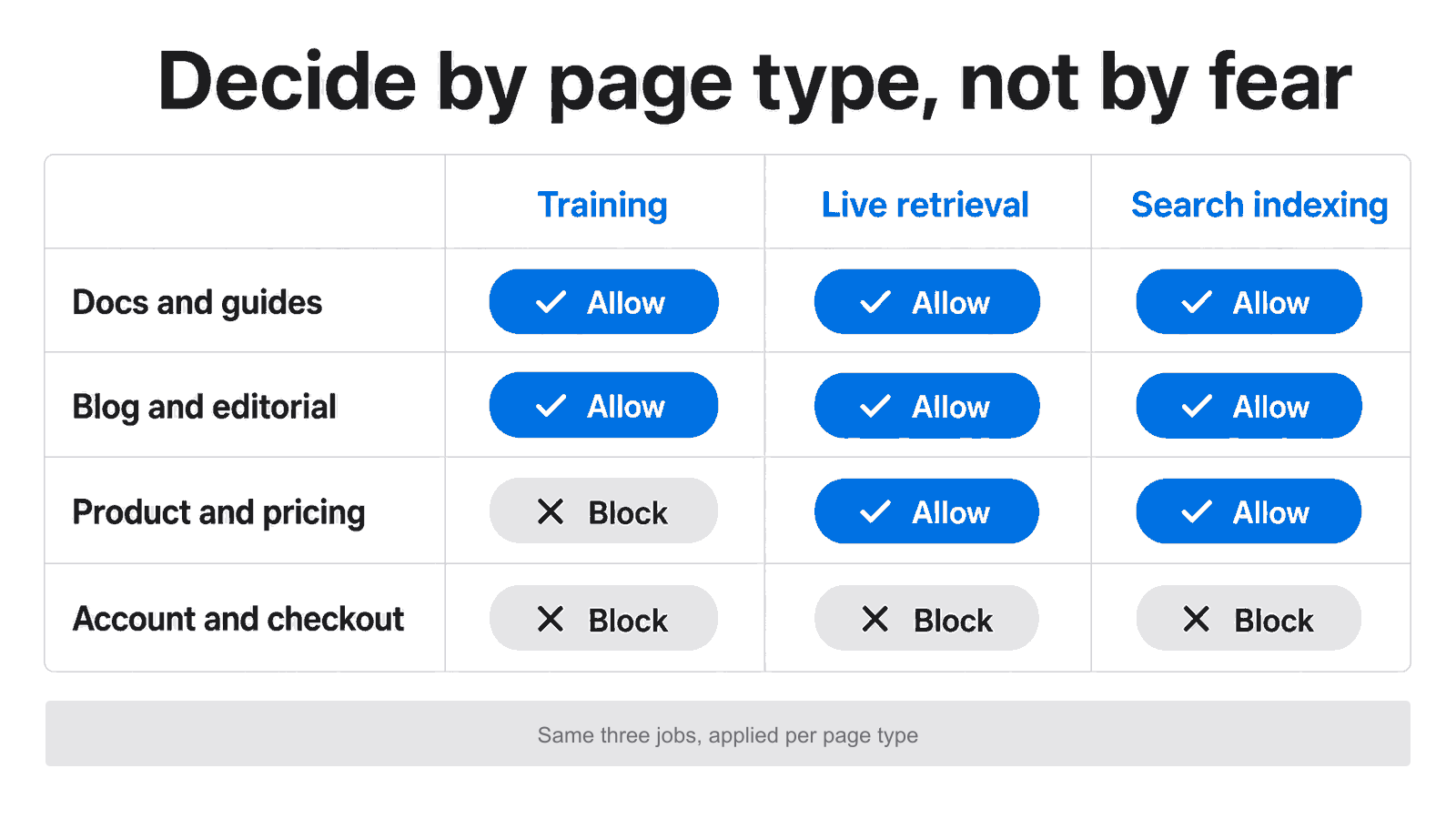
Figure 2: A page-type matrix turns six bot names into a small set of clear allow-or-block decisions.
Start with three questions for every section of your site. Do I want this content used for training? Do I want it fetched live when a user asks? Do I want it indexed for AI search? Your answers rarely match across page types, and that is fine. A glossary page and a billing page should not share a policy.
This is also where syntax and strategy separate. A rule can be perfectly valid and still be strategically wrong. What Blocks AI Visibility in robots.txt is useful here because it shows how a clean-looking file can still cut off the access you meant to keep.
A workable default for public content
For most public content sites, a sane baseline looks like this:
- Allow live retrieval and search indexing on public guides, docs, and blog content
- Decide training case by case, often blocking it on premium or original work
- Block all AI jobs on account, checkout, and internal pages
- Keep the file readable enough that a teammate can audit it in two minutes
How do you verify the policy actually works?
Test the real bot and path combinations, because a clean-looking robots.txt can still behave differently than you expect. Reading the file by eye misses precedence rules, stray wildcards, and inherited directives. Run a broad check first, then inspect specific paths so you know what each agent can actually reach on the pages you care about.
Start with the AI Readiness Checker for the broad signal on whether a page is friendly to AI retrieval. If a page looks weak, move into bot-level debugging. The AI Bot Path Tester tells you whether a specific user-agent can reach a specific URL, and the Robots.txt Validator catches rule conflicts before they ship.
That workflow answers the questions that actually matter. Is ChatGPT-User allowed on /blog/? Is ClaudeBot blocked from /guides/ by an old rule? Did a broad Disallow quietly catch a high-value directory? Eyeballing the file will not tell you. Testing the path will.
When access is clean but results are still poor
Sometimes the file is fine and you still are not cited. That is not a robots problem. The page may be too thin, too buried, or too weakly sourced to quote. At that point you switch from access work to content work, because allowing a bot only helps if there is something worth extracting once it arrives.
FAQ
Does blocking GPTBot stop ChatGPT from reading my site?
No. GPTBot is OpenAI’s training crawler only. ChatGPT reads your page live through a separate agent called ChatGPT-User, and it indexes your site for search through OAI-SearchBot (OpenAI Developer Docs, 2025). Blocking GPTBot removes you from training while leaving live retrieval and search access intact.
What is the difference between ClaudeBot and Claude-User?
ClaudeBot collects content to train Anthropic’s models. Claude-User fetches a page in real time when a person asks Claude a question. Anthropic states that blocking Claude-User reduces your visibility in user-directed answers, while blocking ClaudeBot only removes content from training (Search Engine Roundtable, 2026).
Can I block training but stay visible in AI search?
Yes. The bots are separated by purpose with distinct user-agents and robots.txt controls. Block the training crawlers (GPTBot, ClaudeBot) and allow the search indexers (OAI-SearchBot, Claude-SearchBot) plus the live agents. News publishers do exactly this: 62% block GPTBot while keeping user-initiated bots far more open (BuzzStream, 2026).
Which AI bot brings the most live traffic?
ChatGPT-User leads live retrieval. Within the user-action crawling category, ChatGPT-User drove the large majority of requests in mid-2025, and that whole category grew more than 15-fold over the year (Cloudflare, 2025). If you want users arriving from chatbots, do not block live agents with a blanket rule.
How often should I review my AI bot policy?
Review it whenever you change your stance on AI crawling, launch a new content section, migrate directories, or edit robots.txt for any reason. Vendors also add and rename bots, as Anthropic did in its February 2026 documentation update (Search Engine Roundtable, 2026). Treat bot policy as living infrastructure, not a one-time setup.
What To Do Next
Name the bot, test the path, then write the policy you actually intend to enforce. Run your key pages through the AI Readiness Checker to get the broad signal, then confirm specific bot-and-path combinations so a stray rule is not hiding from you. If your access is already clean and you still are not getting cited, the next step is content, not robots: read How to Optimize Your Site for AI Citations so the bots you allow can extract something worth quoting. For the rules themselves, What Blocks AI Visibility in robots.txt shows where valid syntax still costs you visibility.