How to Prioritize Technical SEO Issues After an Audit
A technical SEO audit loses value fast when every issue looks equally important. The real work starts after the report, when you decide what affects crawling, indexing, or site quality enough to fix first and what can wait.
- Technical SEO
- Prioritization
- SEO Audit
- Site Health
Why a Long Findings List Stalls Teams
A long findings list stalls teams because every warning competes for the same attention, and most of them do not deserve it. The fix is triage: score each issue by how much it hurts search and how widely it spreads, then act on the few that score high. Everything else waits in line.
You already have the report. You ran the Technical SEO Audit, and now a screen full of warnings is staring back at you. The temptation is to start at the top and grind down the list. Don’t. That treats a cosmetic alt-text gap the same as a redirect chain swallowing your money pages.
The Ahrefs site audit study of over a million domains makes the point hard to ignore. The most common issues were 3XX redirects on 95.2% of domains, missing image alt attributes on 80.4%, and missing meta descriptions on 72.9% (Ahrefs, 2023). Common is not the same as high-priority. A finding that shows up almost everywhere is rarely the thing dragging your rankings.
Key Takeaways
- Rank every finding by impact times scope, not by where it sits in the report.
- Crawl and indexing blockers on important pages outrank everything else.
- Common issues like 3XX redirects appear on 95.2% of domains (Ahrefs, 2023), so frequency is not urgency.
- Park ambiguous findings in a validation lane instead of the active queue.
- Re-triage after each fix pass so stale priorities don’t linger.
This guide assumes you already have findings in hand. If you don’t yet, start with how to run a technical SEO audit without wasting time, then come back here to prioritize what it surfaces.
How Do You Score an Issue’s Impact and Scope?
Score impact by asking whether the issue blocks crawling, breaks indexing, or only affects presentation. Score scope by asking whether it sits on one page or repeats across a template. Multiply the two. A high-impact, site-wide issue tops the queue. A low-impact, single-page issue sits near the bottom, regardless of how the report ranks it.
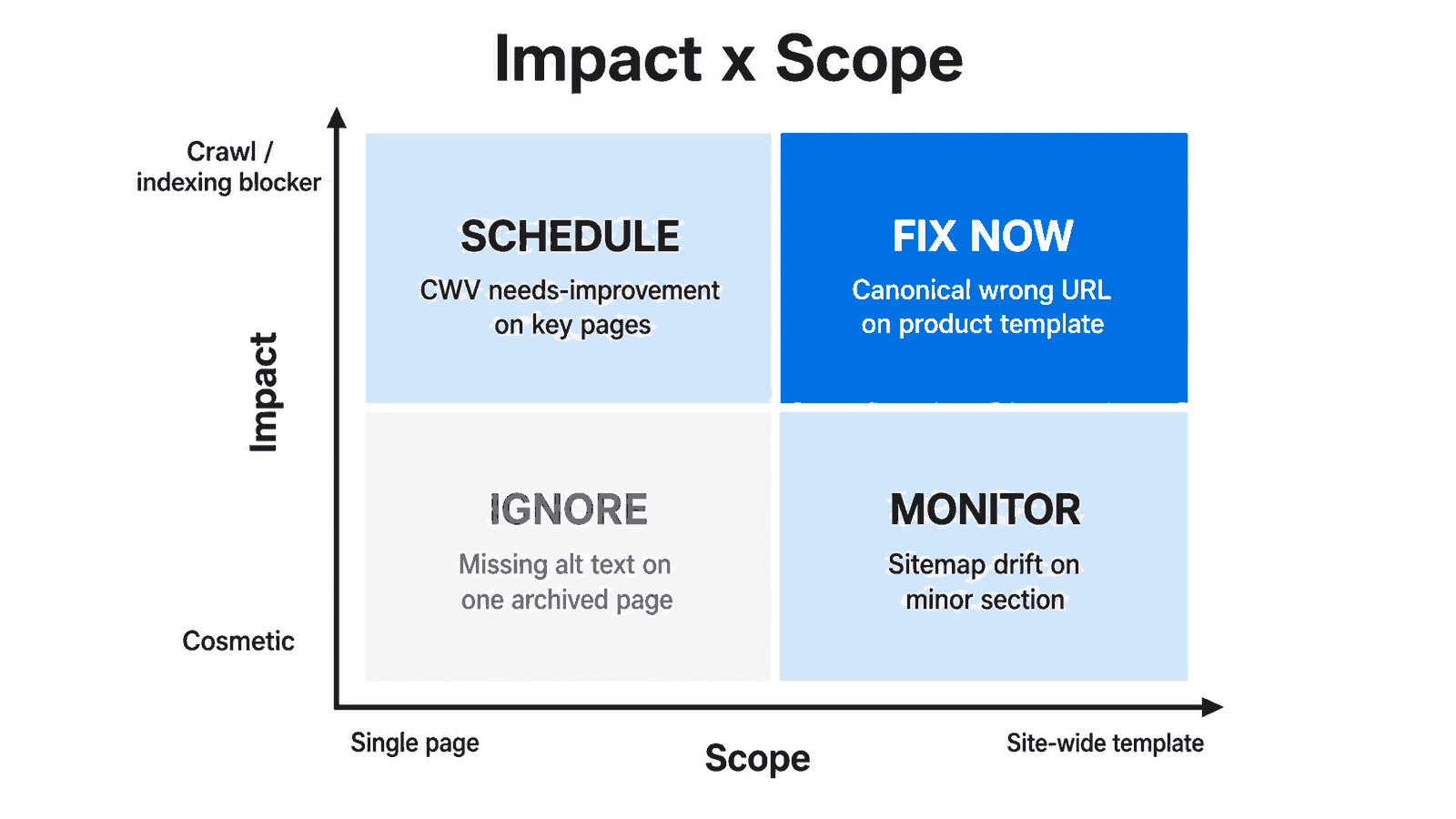
Figure 1: Impact times scope sorts findings into fix now, schedule, monitor, or ignore.
Impact: does it touch crawling or indexing?
Impact is about consequence, not severity color. Ask a blunt question. If this stays broken for a month, does Google still crawl, render, and index the right URL? A blocked resource or a canonical pointing at the wrong page scores high. A missing meta description scores low, because Google often rewrites those anyway.
Scope: one page or a whole template?
Scope is about spread. One broken redirect on a retired blog post is a chore. The same redirect pattern baked into a category template is a system problem. When a finding repeats across your sampled pages, assume it is template-level until proven otherwise. Template issues multiply silently as the site grows.
In our experience, the impact-times-scope read is faster than debating severity labels. A study of over a million domains found 3XX redirects on 95.2% of sites (Ahrefs, 2023). Most are harmless one-hop moves. The dangerous ones are the chains sitting on templates that touch revenue pages, which scope flags instantly.
Which Issues Belong in the Fix-Now Tier?
Fix-now issues block crawling or indexing on pages that matter, and they spread across a template. These are the findings where waiting costs traffic every day. Think canonical tags pointing to the wrong URL on a product template, a redirect loop on category pages, or a robots rule quietly excluding a section you want indexed.
Crawl and indexing blockers come first
Mobile-first indexing is now complete for the entire web, so every site is crawled and indexed using its mobile version (Google Search Central, 2023). That makes mobile-rendering and content-parity gaps table stakes, not optional polish. If your desktop content is rich but the mobile render is thin, that is a fix-now problem hiding inside a “warning.”
Redirect instability on key paths
Redirect chains and loops on important routes belong here. They waste crawl signals, slow users, and occasionally strand a URL entirely. Run the suspect paths through the Redirect Checker to confirm the hop count and the final status. A three-hop chain on a top landing page outranks a hundred cosmetic warnings combined.
Many of these high-impact problems share the same roots. For how they form in the first place, see common technical SEO issues that kill rankings.
What Should You Schedule Instead of Rushing?
Schedule the issues that matter but do not bleed traffic this week. These have real impact or wide scope, just not both at a critical level. Performance regressions, sitemap drift, and internal-link gaps usually live here. They deserve a planned sprint slot, clear ownership, and a deadline, not a panic ticket filed at midnight.
Core Web Vitals: failing versus needs-improvement
Performance is where teams overreact. Google’s “good” thresholds, measured at the 75th percentile of real users, are LCP within 2.5 seconds, INP at or below 200 milliseconds, and CLS at or below 0.1 (web.dev, 2024). Separate genuine failures from “needs improvement” before you assign work. A field metric sitting at 2.7 seconds is a schedule item, not a fire.
Note that INP replaced First Input Delay as a Core Web Vital on March 12, 2024 (web.dev, 2024). It measures full interaction latency across a session, so responsiveness regressions that passed under the old metric may fail now. That alone is a reason to re-triage older audits before trusting their performance verdicts.
Sitemap and crawl-budget reality checks
Sitemap quality issues that slow discovery without blocking it belong on the schedule, not the fire line. Confirm them with the XML Sitemap Validator so you know whether it is a formatting bug or a stale URL set. And resist crawl-budget panic. Google says crawl budget is generally a concern only above roughly one million pages with weekly changes, or 10,000-plus pages changing daily (Google Search Central, 2024). Below that, deprioritize it.
When Should You Just Monitor or Ignore?
Monitor low-impact issues that might spread, and ignore the ones that are cosmetic and isolated. This is the most undervalued part of triage. A deliberate “not now” keeps your active queue honest. Missing alt text on a single archived page, a meta description Google rewrites anyway, or a one-off thin page rarely earns engineering time.
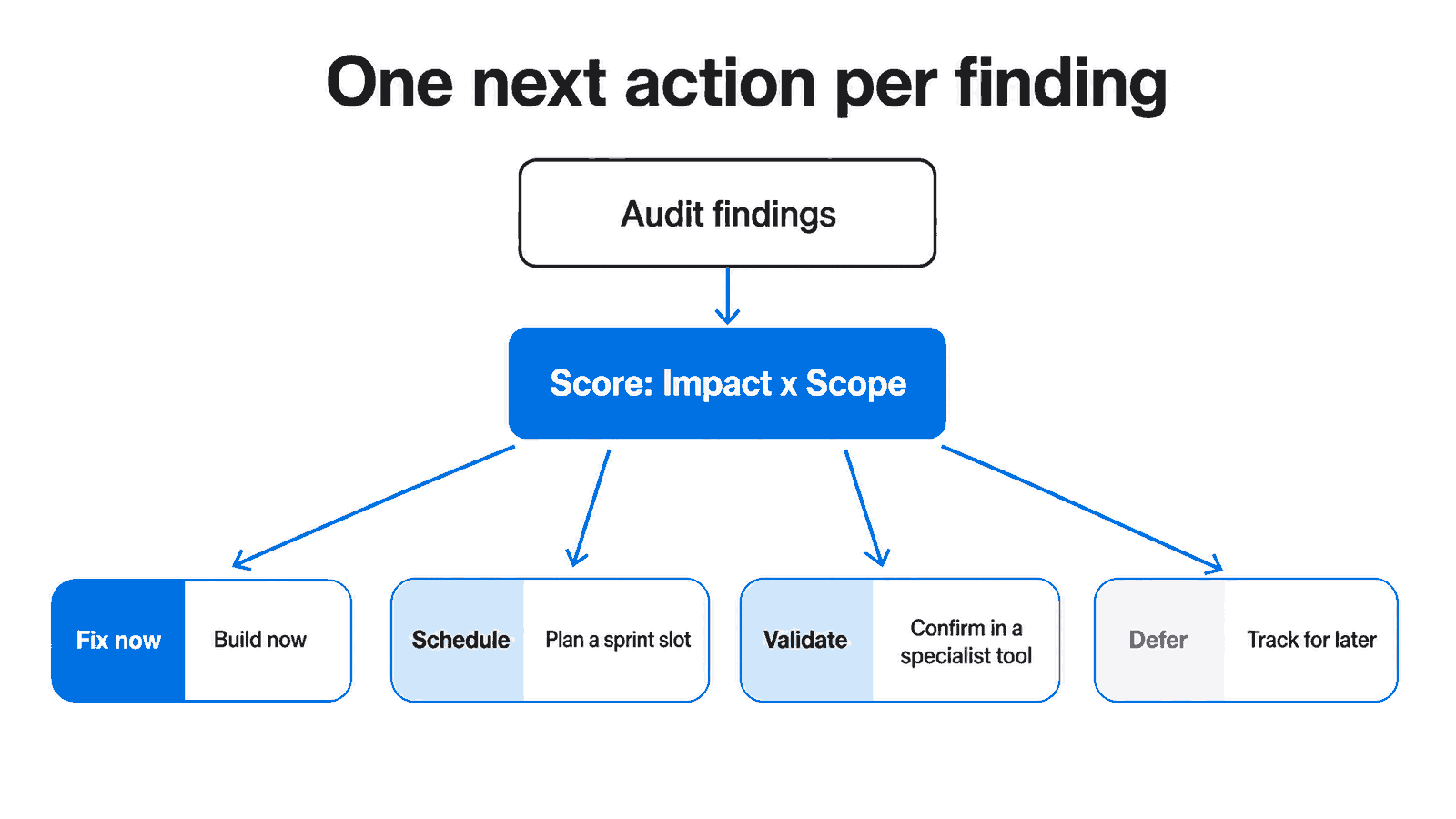
Figure 2: Each tier resolves to one next action, so nothing floats undecided.
Use a validation lane for ambiguous findings
Some findings sit in the gray zone. You suspect they matter, but you cannot prove it from the report alone. Route those to a validation lane instead of the active queue. When the response layer itself looks suspect (odd status codes, caching headers, or vary headers behaving strangely), confirm behavior with the HTTP Header Checker before anyone writes a ticket.
Let indexing data settle before reacting
Indexing reports can mislead you when the data is stale. Late in 2025, the Page Indexing report in Search Console ran a multi-week data delay, as reported by industry trackers like Search Engine Roundtable. When a “currently not indexed” count jumps, we wait for the data to refresh before reordering the queue. Reacting to a reporting lag wastes a sprint.
How Do You Hand Off the Final Priority List?
Hand off a ranked list, not a raw export. For each elevated issue, give developers the URL or template pattern, the issue class, why it affects search, the evidence that confirms it, and which tool validates the fix. That turns a vague warning into something a team can estimate, build, and verify without a second meeting.
One next action per issue
The strongest triage habit is forcing every issue into exactly one next action: fix, schedule, validate, or defer. Findings stall when they float without a verdict. A clear “defer until Q3” is more useful than a finding that quietly sits in the queue, unstarted, for six months while everyone assumes someone else owns it.
Business impact belongs in the handoff too. The Deloitte “Milliseconds Make Millions” study found that a 0.1-second mobile speed gain lifted retail conversions by 8.4% and average order value by 9.2%, with travel conversions up 10.1% (Deloitte, 2024). Pair a performance fix with a number like that and it stops competing with cosmetic tickets.
Your priorities are only as good as the audit behind them. If the scope feels off, revisit what a technical SEO audit should actually check.
Why You Should Re-Triage After Every Fix Pass
Re-triage after every fix pass because priorities go stale the moment you ship. A fix may not move the metric you expected, a new template may introduce fresh issues, and search signals shift. Rerun the Technical SEO Audit after each pass and confirm the issue moved in the direction you planned, not just that a ticket closed.
If the audit still flags the same pattern, your priority was probably right but the implementation assumption was wrong. That is a different conversation than re-debating urgency. We have seen redirect “fixes” that simply added another hop to the chain, which the audit caught on the next run. Verification is part of triage, not a separate afterthought.
There is also a content angle worth weighing. Industry analysts at Indexing Insight reported that across roughly two million monitored URLs, over a quarter were actively removed from Google’s index at the end of May 2025, hitting thin and mass-produced pages hardest. Treat that as a reported trend, not a Google statistic. The lesson stands: a “currently not indexed” cluster tied to weak content can outrank a purely technical fix in priority.
FAQ
Should I always fix the highest-severity issue first?
No. Severity labels measure technical seriousness, not business consequence. An issue marked “critical” on an archived page matters less than a “warning” repeating across your product template. Sort by impact times scope on pages you care about. Severity is one input, not the decision, so weigh it against where the issue actually lives.
How many issues should be in the active queue at once?
Keep the active queue small enough that every item has an owner and a next action. Most teams stall by opening too many workstreams at once. A tight queue of high-confidence issues ships faster than a long list of half-started ones. Move ambiguous findings to a validation lane until you can prove they matter.
Do Core Web Vitals failures outrank content issues?
Usually not. Google has repeatedly framed page experience as more than a tiebreaker but not an override of relevance or content quality, as reported across industry coverage. On a content-strong site, a genuine Core Web Vitals failure still rarely ranks as your single highest-priority fix. Confirm the field data fails the p75 thresholds before you escalate it.
Is crawl budget worth optimizing for my site?
Probably not, unless your site is large. Google states crawl budget is generally a concern only above roughly one million pages changing weekly, or 10,000-plus pages changing daily (Google Search Central, 2024). Below those thresholds, deprioritize crawl-budget work and spend the time on indexing clarity and redirect hygiene instead.
How often should I re-run the audit during triage?
Re-run it after each meaningful fix pass, not after every single ticket. The goal is confirming that an issue moved in the direction you expected, so batch related fixes, then validate. If Search Console data looks stale, wait for it to refresh before making reactive decisions based on indexing counts.
What To Do Next
Run the Technical SEO Audit first, then score each finding by impact times scope and sort it into fix now, schedule, monitor, or ignore. Confirm the high-priority ones in the Redirect Checker, XML Sitemap Validator, and HTTP Header Checker before you hand work to developers. To sharpen the audit that feeds this triage, read How to Run a Technical SEO Audit Without Wasting Time. If a release or migration is coming, pair this with the Technical SEO Checklist for Site Migrations.