How to Check if AI Crawlers Can Access Your Site
A lot of teams jump straight to content tweaks for AI search without checking the basic prerequisite: whether the crawlers are even allowed to fetch the page. If AI bots cannot access your site, they cannot retrieve, summarize, or cite it. This guide shows the fastest way to verify access and isolate the exact block.
- AI SEO
- Robots.txt
- Crawlers
- Technical SEO
Why You Verify Access Before Anything Else
You verify access first because a blocked page cannot be summarized or cited, no matter how good the content is. AI crawler rules are now mainstream: roughly 21% of the top 1,000 sites carry GPTBot directives in robots.txt (Paul Calvano, HTTP Archive, 2025). So a block is plausible, and worth proving.
Key Takeaways
- Test access in four passes: robots.txt, path-level rules, page render, then isolate the exact block.
- “Open to Google” does not mean “open to AI.” GPTBot, ClaudeBot, and CCBot top the list of fully disallowed agents on Cloudflare’s network (Cloudflare Radar, 2025).
- A clean robots.txt result is not proof. ChatGPT-User may ignore it, and CDNs can block at the edge.
- The AI Readiness Checker reads all layers from one live URL.
Here is the trap most teams fall into. They read Allow: / at the top of robots.txt, assume the door is open, and move on to content. Then a more specific rule lower in the file, or a folder-level Disallow, or a CDN rule quietly overrides that assumption. Verification is the only thing that turns a guess into a fact.
This guide gives you a repeatable four-pass workflow. Each pass narrows the search until you can point at the exact line, header, or status code doing the blocking.
What Are the Four Layers You Have to Test?
Access is not one switch. It is four separate layers, and a block can hide in any of them: the robots.txt fetch itself, the path-level rule that matches your URL, the page-level response and headers, and the CDN or firewall that sits in front of everything. Test them in that order.
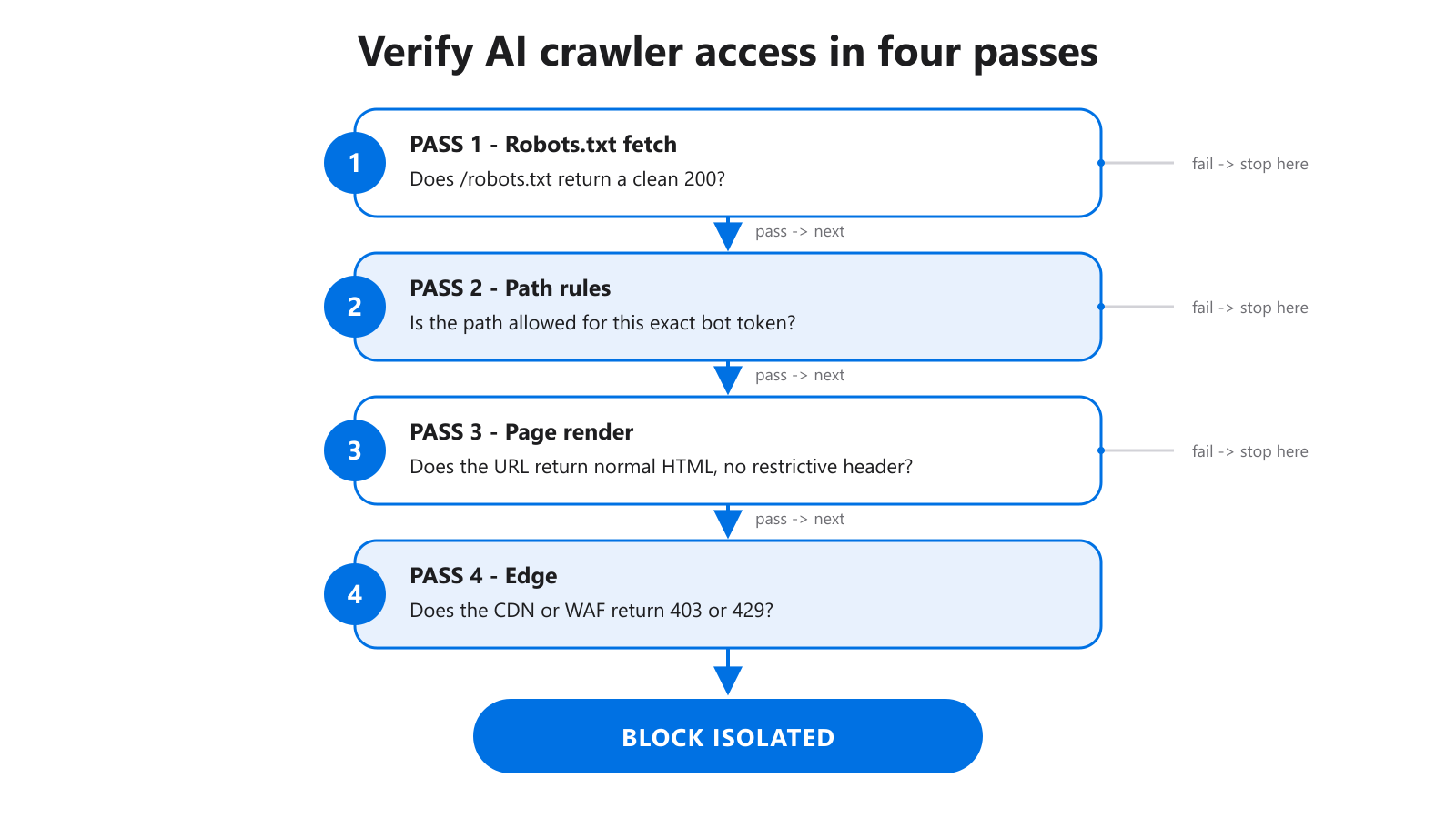
Figure 1: Work top to bottom. Each pass rules out one layer until the real block is isolated.
The reason order matters is simple. A failure at the robots.txt layer makes everything below it irrelevant. There is no point auditing page headers on a URL that the crawler is forbidden to request in the first place. So you start at the top and stop the moment you find the block.
The layers, top to bottom
- Layer 1, robots.txt fetch. Can the bot retrieve
/robots.txtat all, and does it return a clean200? - Layer 2, path rules. Does the rule set allow your specific path for the specific user-agent token?
- Layer 3, page render. Does the URL itself return normal HTML, or does it carry a restrictive header or status code?
- Layer 4, edge. Does a CDN or WAF return a
403or429to the crawler regardless of what robots.txt says?
Most blocks live in Layers 1 and 2. But the painful, hard-to-diagnose ones live in Layers 3 and 4, where robots.txt looks perfectly healthy.
How Do You Test Robots.txt Itself (Pass One)?
Start by confirming the file exists and parses cleanly. About 94% of 12 million sites analyzed serve a robots.txt with at least one directive (Paul Calvano, HTTP Archive, 2025), so the file is almost always there. Your job is to confirm it returns 200, parses without errors, and contains the bot tokens you expect.
Open the Robots.txt Validator and load your file. You are checking three things. First, the response code: a 404 or a 500 means crawlers treat the site as fully allowed, which may not be what you want. Second, syntax: a stray character or a misplaced User-agent line can silently break a whole group. Third, token spelling.
Token spelling is where this quietly breaks
A robots.txt rule only applies when the user-agent token matches exactly what the crawler announces. OpenAI’s training crawler uses the token GPTBot and a full user-agent string containing GPTBot/1.3; +https://openai.com/gptbot (OpenAI Bots Documentation, 2026). Write GptBot or GPT-Bot and the rule does nothing.
In our experience the single most common “we blocked it but it still crawled” finding is a typo in the token, not a logic error. The directive reads as intentional, so nobody questions it during review.
How Do You Test Path-Level Rules (Pass Two)?
Once the file is valid, test the exact URL against the exact bot, because global rules and bot-specific groups often disagree. A site can publish Allow: / for the default agent while a User-agent: GPTBot group below it disallows /blog/. The most specific matching group wins, and that is rarely the one you read first.
Use the AI Bot Path Tester here. Feed it a real path and a specific crawler, then read which rule matched. This is the step that catches the uneven-policy problem, where a homepage is reachable but high-value folders are not.
Why “open to Google” does not mean “open to AI”
This is the misconception that costs the most citations. On Cloudflare’s network, AI crawlers including GPTBot, ClaudeBot, and CCBot are the most frequently fully disallowed user-agents, and publishers commonly block them while keeping Googlebot allowed (Cloudflare Radar, 2025). Your site can rank fine in search and be invisible to answer engines at the same time.
So test a representative sample, not just the homepage. Pick one commercial page, one blog article, one help or docs page, and one category hub. If three pass and one fails, you have found a section the policy left behind, usually after a migration or template change.
How Do You Test Page and Edge Signals (Passes Three and Four)?
Now check the page itself and the infrastructure in front of it, because a URL can be fully allowed in robots.txt and still be unreachable. A page may return a restrictive response header, and a CDN can return a 403 or 429 to a bot’s user-agent at the edge before robots.txt is ever consulted.
This is the layer that breaks the “I read the robots file, it’s fine” conclusion. Robots.txt is advisory and read once. The HTTP response is the ground truth for a single request.
Robots.txt alone cannot prove a block
Two real cases make this concrete. First, ChatGPT-User, the user-triggered fetch agent, may not apply robots.txt rules at all, while GPTBot and OAI-SearchBot do honor them (OpenAI Bots Documentation, 2026). A clean robots result does not prove the page is unreachable from every OpenAI surface.
Second, Google-Extended is a robots.txt-only control token with no separate HTTP user-agent string, so it never appears in your server logs (Google Search Central, 2026). You verify it by reading the rule, never by inspecting access logs.
Isolate the block with a status-code test
For the edge layer, the deciding signal is the response code the crawler’s user-agent receives. CDN and WAF rules increasingly enforce AI blocking, returning 403 or 429 regardless of robots.txt. When robots.txt and path rules both look clean but the bot still cannot fetch, an edge block is the likely culprit. The AI Readiness Checker reads the live response so you see the actual status code, not just the stated policy.
How Do You Turn the Result Into a Fix?
Sort every finding into one of three buckets, because the fix depends entirely on which layer holds the block. Hard blocks need an immediate rule change. Ambiguous policy needs a cleanup pass. A clean access result with weak outcomes means the problem has moved off access entirely and into content.
Bucket 1: hard block
The bot is disallowed in robots.txt, the content folder is blocked, or the edge returns a 403. Fix these first. No content work matters while the crawler cannot fetch the page. Edit the matching rule, then re-test the same path to confirm the fix landed.
Bucket 2: ambiguous policy
No explicit rule for the bot, overlapping groups that are hard to read, or different decisions across similar sections. The site may work today, but ambiguity invites future regressions. A cleanup in the Robots.txt Validator makes the file readable enough that the next person can audit it in a minute.
Bucket 3: access is clean
The crawler fetches reliably and still nothing improves. That is no longer an access problem. It moves to content structure, extractability, and trust. If you blocked training but want retrieval, the distinction is explained in GPTBot vs ChatGPT-User vs ClaudeBot.
When Should You Re-Run the Check?
Re-run the full four-pass workflow after any structural change, because routine site work reintroduces blocks far more often than deliberate policy decisions do. Migrations, redesigns, template updates, new robots.txt edits, and new content sections are the usual culprits. A clean result from last month does not survive a CMS template swap.
A small log habit prevents repeat failures. For each important page, record: URL checked, bots tested, allow or block result, the specific rule matched, the follow-up action, and a recheck date. That six-field log is the difference between “we fixed robots once” and a policy you can actually trust over time. It also makes handoff clean: developers change rules, SEO re-runs the passes, content owners see when a page is ready.
FAQ
Does a valid robots.txt mean AI crawlers can reach my pages?
No. A valid file can still be strategically wrong, and robots.txt is only one of four layers. ChatGPT-User may ignore robots.txt entirely, and CDNs can block at the edge (OpenAI Bots Documentation, 2026). Confirm the live HTTP response, not just the stated rule.
Can I verify Google-Extended access from my server logs?
No. Google-Extended is a robots.txt-only control token with no separate user-agent string, so it never appears in access logs (Google Search Central, 2026). You verify it by reading the matching rule in robots.txt directly, then keeping that rule intentional.
Why does my page rank in Google but not appear in AI answers?
Because the two use different crawlers and you likely blocked one. AI crawlers like GPTBot, ClaudeBot, and CCBot are the most fully disallowed agents on Cloudflare’s network, while Googlebot stays allowed (Cloudflare Radar, 2025). Test the AI bot tokens specifically.
How many pages should I test, not just the homepage?
Test a representative sample of at least four: one commercial page, one article, one help or docs page, and one category hub. Path-level rules often differ by folder, so a homepage pass tells you little about whether /blog/ or /products/ is reachable. Sampling reveals sections left behind by old rules.
What is the fastest way to find the exact block?
Work the four passes in order and stop at the first failure. Start with the AI Readiness Checker for a live read across layers, validate the file, then test the path. The first pass that fails is your block. Fix it, then re-test the same path.
What To Do Next
Run your most important commercial and editorial pages through the AI Readiness Checker, then use the AI Bot Path Tester on any path that looks ambiguous.
If you find problems inside the robots file itself, read What Blocks AI Visibility in robots.txt. If access is already clean, the next issue to fix is usually extractability and citation quality, which we cover in How to Optimize Your Site for AI Citations.