Agent Readiness: How to Prepare Your Site for the Agentic Web
AI agents have moved past reading pages. They book flights, order parts, run checkout, and sign into APIs on behalf of their users. Sites that expose the right signals get used. Sites that don't get skipped. The new Agent Protocol Readiness Checker scans your URL for the exact signals agents now look for.
- AI Agents
- MCP
- Agentic Commerce
- Technical SEO
Why the Agentic Web Needs Its Own Audit
A new class of visitor now reaches your origin before any human does: software that acts. Cloudflare measured AI bot traffic at 4.2% of all HTML requests across its network in 2025 (Cloudflare Radar 2025 Year in Review, 2025). That share buys, books, and signs in. The Agent Protocol Readiness Checker audits whether your site can serve it.
Key Takeaways
- AI bots already drive about 4.2% of HTML requests on Cloudflare’s network (Cloudflare Radar, 2025), and that share is climbing.
- Agents check
/.well-known/paths, content negotiation, and bot-auth keys before they ever parse your HTML.- The checker scores five layers: discovery, content access, identity, capability, and commerce.
- Most first-run sites land between 10 and 30. Three targeted fixes usually move them to a passing grade.
- Start with the highest-weight gaps: Markdown negotiation and protocol discovery together carry 45% of the score.
Think about the order a modern agent does things. It does not open your homepage and start reading top to bottom like a person. It probes. It asks your server a few sharp questions first: do you serve clean Markdown, do you publish a tool manifest, do you accept signed requests, can you take a payment? Only if those probes fail does it fall back to scraping raw HTML, which is slow and lossy.
That probing behavior is why agent readiness is a separate discipline. SEO tunes how Google ranks you. Answer Engine Optimization tunes how chat assistants cite you. Agent readiness tunes something different: whether software can transact with you at all. The checker is a protocol audit, not a content audit. It tells you, layer by layer, where an agent gives up.
What Does the Agent Protocol Readiness Checker Measure?
The checker runs more than 20 probes against a URL and groups them into five scored layers, weighted by impact. Protocol discovery and agentic commerce each carry 25% of the grade, content accessibility 20%, and discoverability and bot access 15% each. Each probe returns pass, warn, or fail with the raw server evidence attached.
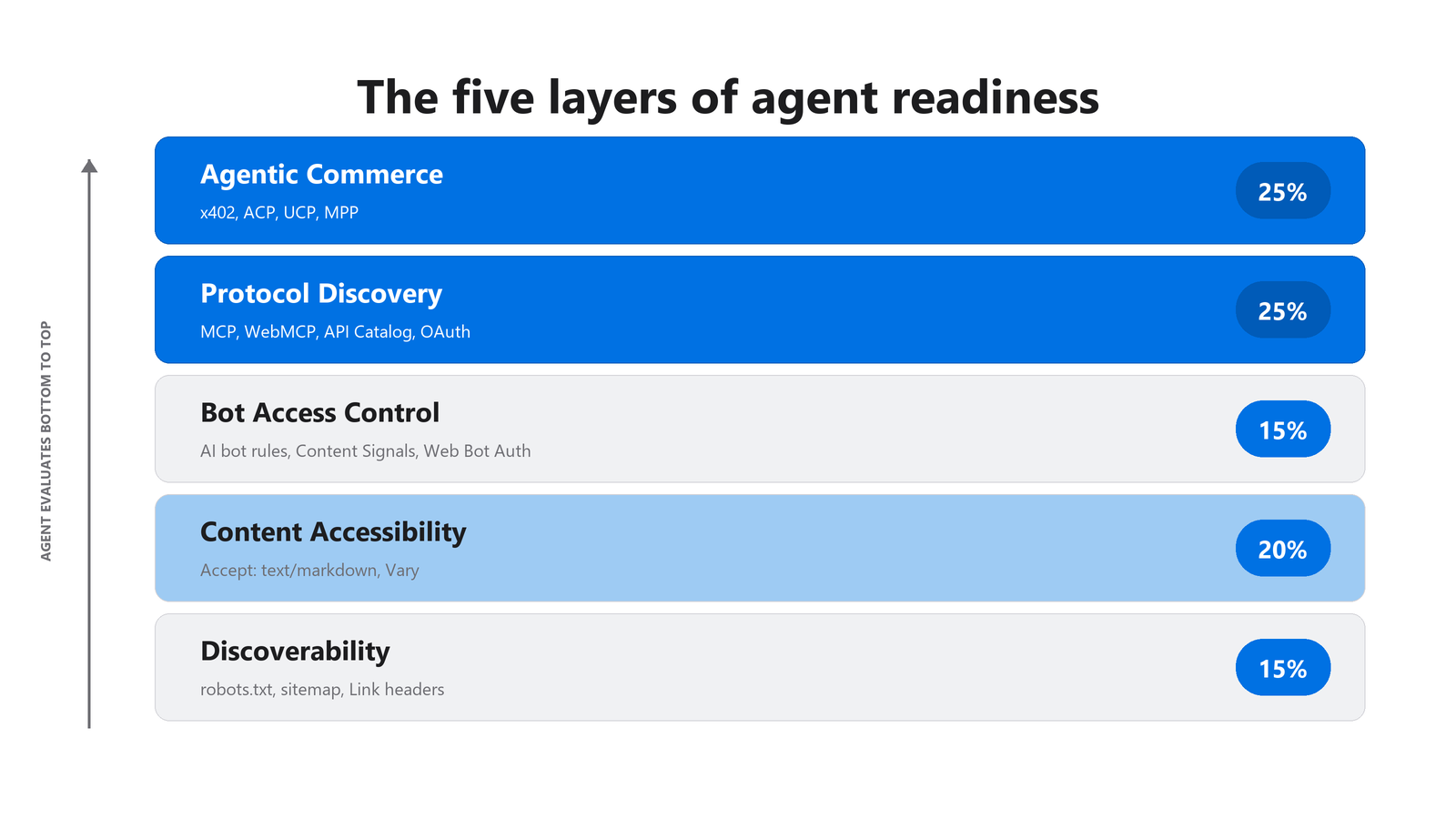
Figure 1: The five layers an agent evaluates, and how much each one weighs in the final grade.
The point of the layering is sequence. An agent that cannot find your robots.txt never reaches the question of whether you serve Markdown. An agent that cannot read your content cleanly rarely bothers checking whether you publish tools. Failures cascade downward, so the lower layers gate everything above them.
Citation capsule
The Agent Protocol Readiness Checker scores five weighted layers across 20-plus probes: discoverability and bot access at 15% each, content accessibility at 20%, and protocol discovery plus agentic commerce at 25% each. Each probe returns pass, warn, or fail with raw server evidence. AI bots already drive 4.2% of HTML requests (Cloudflare Radar, 2025).
We built it because the existing tooling answers the wrong question. Most audits ask “will Google rank this page.” We needed one that asks “can an autonomous agent use this origin without a human.” Those are not the same site. A page can rank beautifully and still be a dead end for a booking agent.
How Do Agents Discover and Read Your Site?
Discovery and content access are the first two layers, and they decide whether an agent ever gets started. Agents resolve robots.txt first, then read Link response headers for pointers, then negotiate content type. Most origins score zero on Markdown negotiation, even though it is the single fix with the best return on effort for AI-mediated traffic.
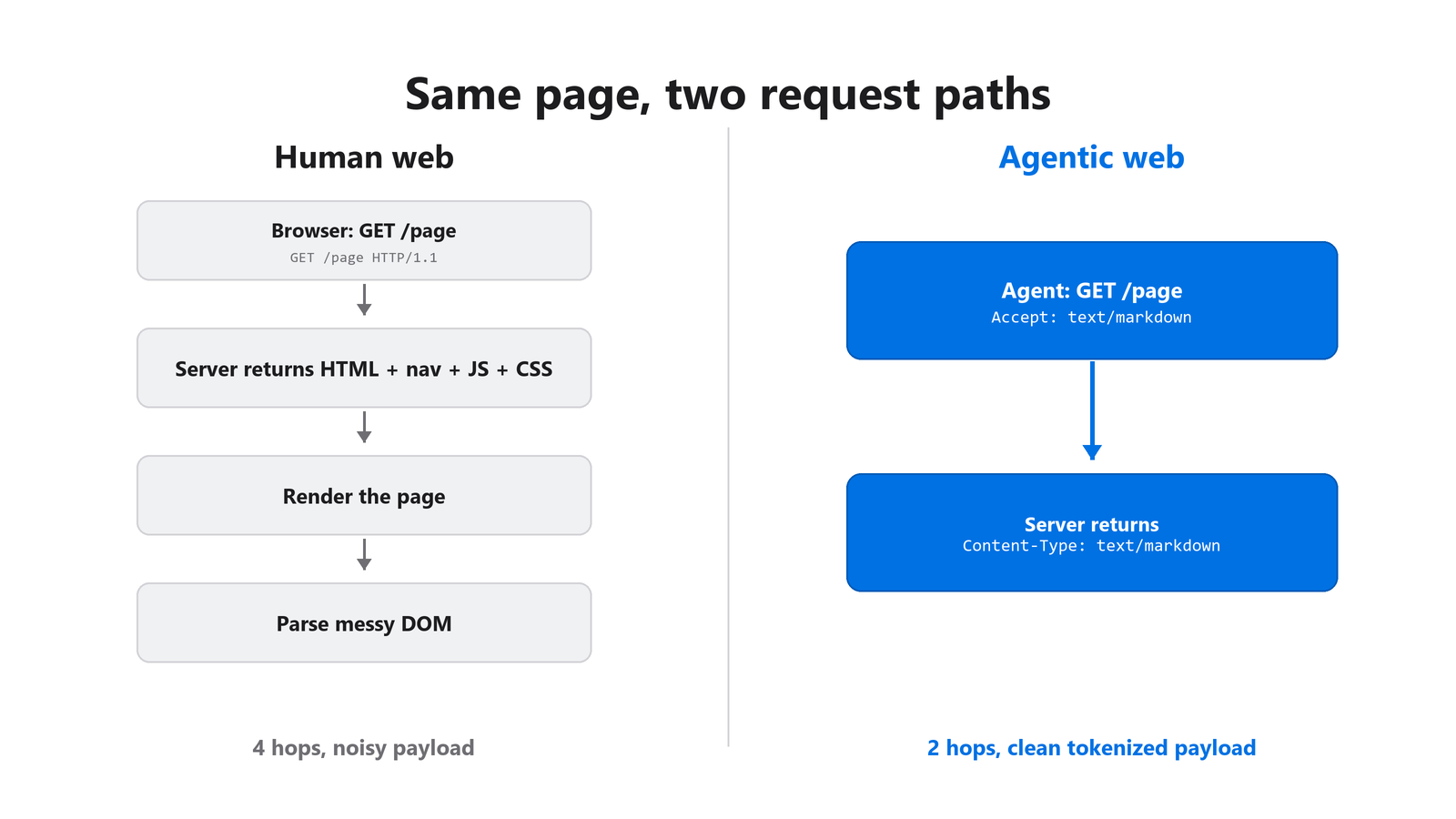
Figure 2: The human web returns rendered HTML. The agentic web returns negotiated Markdown in fewer hops.
Discoverability: the files agents resolve first
Three plain files set the table. A valid robots.txt under RFC 9309, a sitemap that the robots file points to with a Sitemap: line, and Link response headers on your homepage that hint at resources under /.well-known/. An agent that reads Link: </.well-known/mcp/server-card.json>; rel="mcp-server-card" gets its next step for free, no extra round trip. Validate the robots file with our Robots.txt Validator, and inspect what your origin sends today with the HTTP Header Checker.
Content accessibility: serve Markdown on request
This is where most sites fail, and it is the cheapest to fix. The acceptmarkdown.com proposal says that when a client sends Accept: text/markdown, your server should return the same content as Markdown rather than HTML. The checker runs four probes here.
First, it confirms the server honors the header and returns Content-Type: text/markdown; charset=utf-8. Second, it checks for Vary: Accept. Skip that header and a CDN can serve a cached HTML body to the next agent that asked for Markdown, poisoning the response for every AI client behind that cache. Third, an unsupported Accept type should return 406 Not Acceptable, not a silent HTML fallback. Fourth, the server should respect q-values, so text/markdown;q=1.0, text/html;q=0.1 actually returns Markdown.
In our own audits, the typical first run scores zero of four here, and a single CDN worker that transforms HTML to Markdown on demand fixes all four in an afternoon. After that, every agent pulls a clean, tokenized copy of your content instead of wrestling with navigation chrome. For the content-structure side of this question, our AI Readiness Checker scores how well your pages parse.
Citation capsule
Markdown content negotiation follows the acceptmarkdown.com proposal: when a client sends Accept: text/markdown, the server returns Markdown with Content-Type: text/markdown; charset=utf-8 and Vary: Accept. Skipping Vary lets a CDN serve cached HTML to agents requesting Markdown, corrupting responses for every AI client behind that cache.
How Should You Manage AI Bot Access and Identity?
Silence is not a policy. A default robots.txt that names no AI agents leaves every crawler to guess your intent, and the guesses cut against you. The bot access layer rewards explicit rules, a separate content-signals policy, and a published Web Bot Auth key directory so you can tell a real agent from a scraper wearing its name.
GPTBot makes the case for being explicit. Comparing May 2024 to May 2025, GPTBot’s share of combined AI and search crawler traffic rose from 2.2% to 7.7%, a 305% increase in raw requests, moving it from rank nine to rank three (Cloudflare, 2025). When one agent grows that fast, a blanket “block everything” rule costs you real reach.
Name the agents in robots.txt
The checker scans for rules targeting the crawlers that matter now: GPTBot, ChatGPT-User, OAI-SearchBot, ClaudeBot, Google-Extended, PerplexityBot, Meta-ExternalAgent, Applebot-Extended, Bytespider, CCBot, Amazonbot, and more. Three or more named agents earns a pass. Writing User-agent: GPTBot then Allow: / is a public commitment a policy engine can rely on, which is very different from saying nothing. If you want to confirm crawler behavior across versions, our sibling guide on GPTBot vs ChatGPT-User vs ClaudeBot breaks down which name does what.
Separate training from retrieval with Content Signals
Cloudflare’s Content Signals proposal adds three directives inside robots.txt: search, ai-input, and ai-train. They let you allow grounded answers, so your brand still shows up in AI citations, while declining model training. The checker passes on any single Content-Signal: directive. Blocking GPTBot outright is a blunt swing that takes out citations and training together. Our breakdown of what blocks AI visibility in robots.txt covers the common over-blocks.
Verify agents with Web Bot Auth
Web Bot Auth lets agents sign requests with an Ed25519 keypair, publishing the public key as a JWKS at /.well-known/http-message-signature-directory. It is moving from proposal to production fast: AWS WAF announced Web Bot Auth support in November 2025 (AWS, 2025), with Cloudflare, Anthropic, and OpenAI behind the underlying IETF work. The checker probes that directory and confirms it returns JSON. Without it, you cannot prove a legitimate agent from a spoofer, and verified agents get lower rate limits and broader access.
What Protocols Let Agents Use Your Site as a Tool?
Protocol discovery is the heart of the checker and its heaviest layer at 25%. It looks at the /.well-known/ endpoints and in-page annotations that turn your site from a document into a callable tool. The anchor here is the Model Context Protocol, which Anthropic open-sourced on November 25, 2024 (Anthropic, 2024) and which OpenAI and Google adopted within a year.
MCP Server Card
An MCP Server Card at /.well-known/mcp/server-card.json advertises your server’s name, capabilities, transport, and auth model. The checker probes that path and falls back to /.well-known/mcp.json. If your product has any API at all, a Server Card is the change that flips your site from “scrape it” to “invoke it.” An agent that finds a card stops parsing HTML and starts calling functions, which is cheaper for you and faster for the user.
WebMCP for in-browser agents
MCP assumes a server-to-server world, but a lot of agent activity now happens inside a browser tab, and WebMCP fills that gap. Instead of a /.well-known/ URL, you annotate <form> elements directly with tool attributes or declare tools via a <meta name="webmcp"> tag, exposing callable actions to an agent already on the page. The proposal arrived as a joint Google and Microsoft effort in 2025 and was accepted by a W3C Community Group, with Chrome shipping an early preview, so treat the exact version numbers as moving targets. The checker scans your homepage for either pattern. The practical lesson: if your conversions happen in-page, server-side MCP alone leaves agents stuck at your forms.
API Catalog and OAuth discovery
Two more discovery surfaces round out the layer. RFC 9727 defines /.well-known/api-catalog as a application/linkset+json pointer to every API you expose. Many origins warn here because they serve the path with application/json instead, a one-header fix. Then OAuth discovery: RFC 8414 metadata at /.well-known/oauth-authorization-server tells an agent how to start an auth flow, and RFC 9728 metadata at /.well-known/oauth-protected-resource tells it, on a 401, which issuer and scopes to use. Without OAuth discovery, no agent can automate a signed-in action on your site.
Citation capsule
The Model Context Protocol, open-sourced by Anthropic on November 25, 2024 (Anthropic, 2024), lets agents discover callable tools through an MCP Server Card at /.well-known/mcp/server-card.json. Within roughly a year, OpenAI and Google adopted it, making MCP the de-facto discovery layer the Agent Protocol Readiness Checker probes first.
Can an Agent Actually Pay You?
Agentic commerce is the newest layer and ties for the heaviest at 25%. The question is blunt: when an agent wants to buy from you for its user, what does that transaction look like? Adobe Analytics found that visits to US retail sites from generative AI sources jumped 1,200% between July 2024 and February 2025 (Adobe, 2025). The referrals already arrive. The checkout has to be ready.
The stakes get larger from here. Gartner forecasts that AI agents will intermediate more than $15 trillion in B2B spending by 2028 (Gartner, via Digital Commerce 360, 2025). A passing commerce score does not require supporting every standard. It requires at least one, because “an agent can pay you” is one capability with four protocols competing to own it.
x402: the lowest-commitment path
x402 revives HTTP status 402, “Payment Required,” with a machine-readable offer header that lists price, currency, and settlement endpoint. The agent receives the 402, signs a payment, resubmits, and gets the resource. Adoption is real: Coinbase’s x402 protocol passed 100 million cumulative transactions on the Base network by early 2026 (Crypto Briefing, 2026), with on-chain figures sourced from the project rather than a neutral auditor. You pick one paid endpoint, return a 402 with terms, and you are live.
ACP: full checkout for retail
The Agentic Commerce Protocol is the fuller surface. Stripe and OpenAI launched ACP alongside Instant Checkout in ChatGPT on September 29, 2025 (Stripe Newsroom, 2025), starting with US Etsy sellers and over a million Shopify merchants including Glossier, Vuori, Spanx, and SKIMS. ACP lives at /.well-known/agentic-commerce and describes catalog, pricing, tax, shipping, and returns. If you sell goods and want ChatGPT to transact directly, this is the lane.
UCP and MPP: lighter and more general
Two earlier-stage options round out the layer, and the checker treats them as emerging rather than settled standards. UCP piggybacks on OAuth: you declare commerce scopes like ucp:scopes:checkout_session inside your OAuth metadata, so if you already ship tokens you are halfway there. MPP, advertised at /.well-known/machine-payments, is the most general, describing which machine-to-machine rails you accept, from stablecoins to bank transfers to per-token metering. Neither has the documented, primary-source backing that MCP, ACP, and x402 carry, so define them from your own spec and watch how they consolidate.
How Do You Read the Score and Fix the Gaps?
The checker rolls the five layers into a weighted A-to-F grade. Scores above 85 earn an A, 70 to 84 a B, and lower grades fall off sharply on purpose: a D-range site does not advertise tools, serve Markdown, or accept agent payments, so for agent-driven traffic it reads as a parked domain. In our audits, most sites start between 10 and 30.
| Layer | Weight |
|---|---|
| Discoverability | 15% |
| Content Accessibility | 20% |
| Bot Access Control | 15% |
| Protocol Discovery | 25% |
| Agentic Commerce | 25% |
That low starting point is expected, and it is workable. The tool surfaces the six highest-leverage fixes, and clearing three of them usually moves a site from F to C inside a day.
A practical order to fix things
Work the layers in dependency order so each fix unblocks the next.
- Publish a valid robots.txt with explicit
User-agent:rules for GPTBot, ClaudeBot, Google-Extended, and PerplexityBot, plus aSitemap:line. Validate it with the Robots.txt Validator. - Add Markdown content negotiation at your CDN edge: honor
Accept: text/markdown, setVary: Accept, return 406 for unsupported types. - Publish an llms.txt at your root pointing at the pages you most want agents to cite. Generate and validate it with the LLMs.txt Generator + Validator, and see our take on whether you need llms.txt.
- Expose a minimal MCP Server Card at
/.well-known/mcp/server-card.jsonso agents can discover your tools. - Add one Content Signals directive to robots.txt to publish a real training-versus-retrieval policy.
- Publish a Web Bot Auth JWKS so verified agents can sign requests.
Across the sites we have run through the checker, that sequence is roughly two engineer-days of work on a normal CDN and auth stack, and it reliably moves an origin from F to B. To confirm your robots rules actually let crawlers through, pair this with our guide on how to check if AI crawlers can access your site.
FAQ
Is agent readiness different from SEO and AEO?
Yes. SEO tunes search ranking, and Answer Engine Optimization tunes how chat assistants cite you. Agent readiness tunes whether software can transact with your origin at all: discover tools, negotiate content, sign in, and pay. A page can rank well and still be a dead end for an autonomous booking agent.
Which fix gives the fastest return?
Markdown content negotiation. Most sites score zero of four on it, yet a single CDN worker that honors Accept: text/markdown, sets Vary: Accept, and returns 406 for unsupported types fixes all four probes in an afternoon. Content accessibility carries 20% of the grade, so the points-per-hour return is high.
Do I need to support every commerce protocol?
No. The agentic commerce layer passes on any single standard, because “an agent can pay you” is one capability with four protocols competing to own it. Pick the one that fits: x402 for low-commitment paid endpoints, ACP for full retail checkout, UCP if you already ship OAuth tokens.
How fast is agent traffic actually growing?
Quickly. AI bots reached 4.2% of HTML requests on Cloudflare’s network in 2025 (Cloudflare Radar, 2025), GPTBot’s crawler share rose 305% in raw requests year over year (Cloudflare, 2025), and retail visits from generative AI sources jumped 1,200% in eight months (Adobe, 2025).
Will these checks stay the same next year?
No, and that is fine. MCP will formalize capability negotiation, WebMCP version details are still moving, and the commerce protocols will consolidate. We add probes as standards land and retire them as they become default. The shape of the problem holds: expose what your site can do, clearly, in the first few requests.
What To Do Next
Run the Agent Protocol Readiness Checker against your homepage, fix the top three recommendations, then run it again and watch how differently agents treat your origin. The probes are free, browser-based, and return the raw server evidence behind every verdict.
From there, two sibling guides go deeper. Read how to check if AI crawlers can access your site to confirm your robots rules do what you think, and the complete guide to Answer Engine Optimization to make the content those agents reach worth citing.